
Java Scanner Class - Definition And Example
Java Scanner Class is a part of Java.util package, which is used for getting input from the user in the form of text or numbers during program execution. READ here to explore Java Scanner class in detail with examples.
 Varun Saharawat30 Oct, 2025
The Java Scanner class belongs to the java.util package and was added in the Java programming language during its 1.5 release. It is mainly used to get input from users and convert that input into basic data types like int, double, or String. This class is a helpful tool for breaking down data using regular expressions to create tokens, making it easier for programmers to work with it.
Java Scanner Class - Input Types
The Scanner class in Java is designed to read different types of input, making it easier for users to interact with a program. It has several methods, each made for handling a specific data type. Learning about these methods will help you understand how to use the Java Scanner class effectively. Let us understand the different methods used for extracting data with the help of the table given below:| Java Scanner Class Input Types | |
| Method | Description |
| nextBoolean() | Reads the next input and returns it as either true or false. It is used to handle boolean values. |
| nextByte() | Reads the next input as a byte value (small integer). Useful for handling small numerical data within the byte range. |
| nextDouble() | Reads the next input as a double-precision floating-point number. Ideal for situations where higher precision is needed for decimal values. |
| nextFloat() | Reads the next input as a single-precision floating-point number. Suitable for capturing float values when less precision is acceptable. |
| nextInt() | Reads the next input as an integer. Useful for working with whole numbers. |
| nextLine() | Reads the entire next line of input, including spaces and characters. Perfect for capturing text data. |
| nextLong() | Reads the next input as a long integer. Useful for handling larger whole numbers that are outside the range of “nextInt()”. |
| nextShort() | Reads the next input as a short integer. Ideal for smaller numerical values when memory constraints are important. |
Java Scanner Class Declaration
To use the Java scanner class in your program, you need to first declare and initialize it. The basic syntax for Java scanner class declaration is given in a table below for your reference:| Java Scanner Class Declaration |
| Scanner scannerName = new Scanner(inputSource); |
- Scanner: This is the class name.
- scannerName: This is the object name you choose to represent the Scanner. You can name it anything, like input, scanner, or reader.
- new Scanner(inputSource): This initializes the Scanner object and defines its input source, this source of input can be anything like:
- System.in- For keyboard input
- A File object- for taking input from file
- A string or an input stream- This means the scanner class can read input from a string or other sources like network data streams.
Java Scanner Class Examples
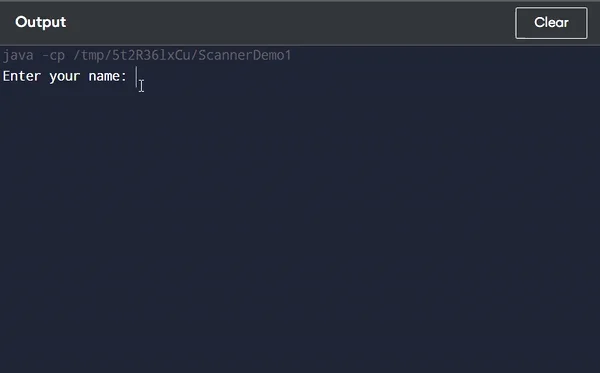
The java.util package in Java has a class called Scanner. This class helps to connect the program with the input stream, allowing it to read and understand different types of data like strings, characters, integers, and doubles. Let us look at Java Scanner Class examples to see how the Scanner class in Java works in a program. In this program, we will collect some basic information about a person and display it on the console. This will help us to understand how the Scanner class captures and processes user input.| Java Scanner Class Examples |
| // Java program to read data of various types using Scanner import java.util.Scanner; public class ScannerDemo1 { public static void main(String[] args) { // Create a Scanner object to read input from the console Scanner PW = new Scanner(System.in); // Prompt the user for input and read the values // String input System.out.print("Enter your name: "); String name = PW.nextLine(); // Character input System.out.print("Enter your gender (M/F): "); char gender = PW.next().charAt(0); // Integer input System.out.print("Enter your age: "); int age = PW.nextInt(); // Long input System.out.print("Enter your mobile number: "); long mobileNo = PW.nextLong(); // Double input System.out.print("Enter your CGPA: "); double cgpa = PW.nextDouble(); // Print the values to check if the input was correctly obtained System.out.println("\n--- User Details ---"); System.out.println("Name: " + name); System.out.println("Gender: " + gender); System.out.println("Age: " + age); System.out.println("Mobile Number: " + mobileNo); System.out.println("CGPA: " + cgpa); // Close the Scanner object PW.close(); } } |
Sample Output:
 |
Key Features Of Java Scanner Class
- Easy Input Handling: The Scanner class in Java makes handling of user input more simple by providing methods of handling for different data types like integers, strings, and more.
- Part of Java Library: The Scanner class in Java is included in the `java.util` package, so you don’t need to add any extra imports to use it.
- Reads from Different Sources: The Scanner class can read input from multiple sources like from the keyboard or files.
- Wide Range of Methods: Scanner Class In Java has many methods that work with basic data types, strings, and custom patterns, making it highly versatile.
Learn Java WIth PW Skills
Start your journey of learning Java programming with our exclusive PW Skills Java With DSA Course. The key features of this course that make it a standout choice among students include- Mentorship from expert industrialists, regular doubt-clearing sessions, daily practice sheets, in-demand course curriculum, placement assistance, PW alumni support, and much more. So, don’t waste much of your time, Visit pwskills.com today and start your journey of becoming a skilled Java Developer with us. Recommended Course



Java Scanner Class FAQs
What is the Java Scanner class?
The Java Scanner class is a part of the java.util package and is used to read input from various sources, including the keyboard, files, and strings. It simplifies the process of parsing different data types.
What methods are available in the Scanner class?
The Scanner class provides several methods, including:
nextInt(): Reads an integer.
nextDouble(): Reads a double.
nextLine(): Reads a whole line of text.
next(): Reads the next token as a string.
How do I import the Scanner class in Java?
To use the Scanner class, simply add the following import statement at the beginning of your Java program: import java.util.Scanner;


Talk to a counsellorHave doubts? Our support team will be happy to assist you!



Get Free Counselling Today
and Clear up all your Doubts
Talk to Our Counsellor just by filling out the form.
Join 15 Million students on the app today!
 Live & recorded classes available at easeDashboard for progress trackingLakhs of practice questions

