

Html Tutorial - Definition, Tags, Examples
The HTML tutorial is a guide to help you learn the basics and advanced concepts of HTML Markup language in web development. Learn about different HTML tags, attributes, classes, and more in this HTML tutorial.
 Varun Saharawat11 Jul, 2026
This HTML tutorial will provide you with a simple roadmap to learn Hyper Text Markup Language (HTML). HTML markup language is used in almost all major websites coded by developers. If you want to learn how to build web pages, then it is important for you to start with HTML first.
In this HTML tutorial, we will learn how to use HTML tags and attributes to create web pages. We will start with the fundamentals of web development: HTML basic tags, formatting tags, classes, layout and more. We will then also know what to learn next in web development. After reading this tutorial you will build a strong foundation in HTML.
What is HTML?
HTML or Hyper Text Markup Language is used to define the layout and structure of a web application over the internet. They contain different tags with attributes that help search engines understand how to render different elements of the web page on the internet. HTML lays the foundation of web development as it integrates different frameworks and tools for web pages. Every front end and backend framework uses HTML to integrate their features into the web pages.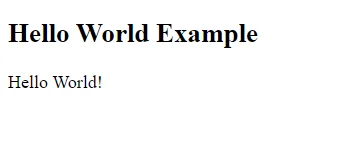
Hello World! Program In HTML
The Hello World program is a simple classic example of HTML which displays the text “Hello World!” on the web page. Many of us use this classic example while learning programming, web development, and other technical web concepts.| <!DOCTYPE html> <html> <head> <title> HTML Tutorial </title> </head> <body> <h2> Hello World Example </h2> <p> Hello World! </p> </body> </html> |
HTML Tutorial Roadmap
The HTML tutorial is further divided into certain sections which provide a roadmap to master using HTML for website development. It is important to follow a defined step by step method to master web development with HTML.HTML Basics
HTML basics contains the knowledge of the fundamentals of using HTML to create web pages. It defines the HTML, features, elements, tags and structure used in web development. Check some of the important HTML basics Tag Category in the table below.| Category | Tag | Description |
| Document Structure | <!DOCTYPE html> | Defines the document type and HTML version. |
| <html> | Root element of an HTML document. | |
| <head> | Container for metadata and external resources. | |
| <title> | Sets the webpage title displayed in the browser tab. | |
| <body> | Main content of the webpage. | |
| Text Formatting | <h1> to <h6> | Headings (h1 is the largest, h6 is the smallest). |
| <p> | Paragraph. | |
| <br> | Line break. | |
| <hr> | Horizontal rule (divider line). | |
| <strong> | Bold text (important, semantically). | |
| <em> | Italic text (important, semantically). | |
| <b> | Bold text (stylistic purposes). | |
| <i> | Italic text (stylistic purposes). | |
| <u> | Underlined text. | |
| <small> | Smaller text. | |
| <mark> | Highlighted text. | |
| Grouping | <div> | Block-level container for organizing elements. |
| <span> | Inline container for text or inline elements. | |
| List | <ul> | Unordered list (bullet points). |
| <ol> | Ordered list (numbered). | |
| <li> | List item, used inside <ul> or <ol>. | |
| Link & Navigation | <a> | Anchor tag, used to create links. |
| <nav> | Section for navigation links. | |
| Image & Media | <img> | Embeds an image. |
| <audio> | Embeds audio content. | |
| <video> | Embeds video content. | |
| <source> | Defines media resources for <audio> or <video>. | |
| <figure> | Self-contained content, like images or diagrams. | |
| <figcaption> | Caption for <figure> content. | |
| Table | <table> | Table element. |
| <tr> | Table row. | |
| <td> | Table cell. | |
| <th> | Table header cell. | |
| <thead> | Table header section. | |
| <tbody> | Table body section. | |
| <tfoot> | Table footer section. | |
| HTML Form | <form> | Container for form elements. |
| <input> | Input field for user data. | |
| <textarea> | Multi-line text input field. | |
| <button> | Button element. | |
| <select> | Dropdown list. | |
| <option> | Option in a dropdown list. | |
| <label> | Label for form elements. | |
| <fieldset> | Grouping for related form elements. | |
| <legend> | Title for a <fieldset> group. | |
| Semantic & Layout | <header> | Header section for introductory content. |
| <footer> | Footer section for concluding content. | |
| <section> | Defines a section in a document. | |
| <article> | Self-contained content (like a blog post). | |
| <aside> | Sidebar content, related but secondary. | |
| <main> | Main content of the document. | |
| <figure> | Groups media content with <figcaption>. | |
| Metadata & Scripting | <meta> | Provides metadata (e.g., charset, viewport). |
| <link> | Links to external resources like CSS files. | |
| <style> | Embeds CSS styles within HTML | |
| <script> | Embeds JavaScript code. |
HTML References
The HTML references contain all HTML tags classified in categories, attributes, comments, and with their uses in the web page development. The HTML references also define the page layout with all tags arranged as metadata, flow content, sectioning element, heading element, embedded element, scripted element, etc.
- HTML element references
- HTML attribute references
- Global attribute references
- HTML5 references
| Metadata elements |
|
| Flow Content |
|
| Sectioning Content |
|
| Heading Content |
|
| Phrasing Content |
|
| Embedded Content |
|
| Interactive Content |
|
| Form associated content |
|
HTML Projects
Working on web development real world projects is important to strengthen your knowledge of HTML fundamentals as well as scale your knowledge of tags, elements, and attributes. Learn how to build HTML Web Development Projects in PW Skills Full Stack Web Development Course Learn and start practice from beginner-level projects to advanced projects using HTML.HTML Tables
The HTML tables are a method to organise data into rows and columns making it more readable for visitors. You can add tables in your web page, customize table cells, and add captions with plenty of other customisation options.| Tag | Description |
| <table> | Defines a table structure for organizing data in rows/columns. |
| <tr> | Table row, used within <table> to create rows of data. |
| <td> | Table cell, used within <tr> to contain individual data items. |
| <th> | Table header cell, often used for headings in tables. Appears bold and centered by default. |
| <caption> | Adds a title or caption to the table, usually displayed above the table. |
HTML Lists
The HTML lists are used to oranise information in pointers or numbers on a website which makes it more readable. When there are multiple items to add one by one we often use lists. There are mainly three types of lists in HTML.Ordered Lists
An ordered list is used to arrange the elements in an organised or ordered manner on the web page. The ordered list is represented using the <ol> tag.| <ol> <li>First item</li> <li>Second item</li> <li>Third item</li> </ol> |
Unordered Lists
The Unordered Lists are lists with no definite order, as arranging order does not matter in this type of list.| <ul> <li>Item A</li> <li>Item B</li> <li>Item C</li> </ul> |
Description Lists
These Description Lists are frequently used to pair terms with their descriptions. These lists are generally used when we have to describe a particular term, process, or phenomenon etc.| <dl> <dt>HTML</dt> <dd>A standard markup language for creating web pages.</dd> <dt>CSS</dt> <dd>A style sheet language used for describing the look and formatting of a document.</dd> </dl> |
HTML Forms
HTML forms are elements that allow users to interact with the website. We can use these forms to collect information like contact details and other personal information from our visitors. We can collect feedback, run surveys, and more using HTML forms. We can add multiple customizations to HTML forms with tags available to add labels, input fields, buttons, dropdowns, textarea, fieldset, datalist, captions, etc.| Tag | Description |
| <form> | Wraps form elements for collecting user input. |
| <input> | Allows user input in various types (text, password, radio, checkbox, etc.). |
| <label> | Labels an input field to improve accessibility and usability. |
| <textarea> | Creates a multi-line text input field for larger text input. |
| <select> | Dropdown menu for user selection, containing multiple <option> elements. |
| <option> | Defines each option within a <select> dropdown. |
| <button> | Creates a clickable button, often used to submit the form. |
| <fieldset> | Groups related elements in a form, often with a border around them. |
| <legend> | Provides a caption for a <fieldset>, describing the grouped form elements. |
HTML Formatting
These elements can be used in HTML to beautify, customise, and make the text content more readable in web pages.| HTML Formatting Tags | Description |
| <b> | It makes the text more bold and readable |
| <strong> | It also makes the text bold with a semantic value. |
| <i> | It is used to make the text content italic |
| <em> | It makes the content italic and conveys a semantic value to the enclosed text |
| <u> | It is used to underline the text or sentence. |
| <strike> | It is used to pass a strikethrough the text |
| <mark> | It is used to highlight a part of text or sentence with noticeable colors. |
| <sup> | It is used to add superscript to the element |
| <sub> | It is used to add subscript to the element |
| <del> | It is used to delete a part of the text content |
HTML Advanced Concepts
 The HTML advanced concepts takes you one step ahead in web development. It helps you master the HTML fundamentals, tags, and explore more advanced concepts of HTML to build dynamic and responsive websites. Check some of the advanced concepts to learn in HTML.
- How to build an HTML Website?
- How to create iframes in HTML?
- Top 30 HTML Interview Questions 2024
- How to add CSS in HTML for Web development?
- What is Href in HTML?
- What is &NBSP HTML with Explanation?
- HTML vs HTML5 in Web Development
HTML Media Tags
You can easily add video, audio, animate texts and contents in HTML. These media tags help make websites more interactive and user friendly.- How to add Audio to a web page using HTML?
- How to add Video to a web page using HTML?
- What are the benefits of a responsive website?
HTML Interview Questions
It is important to practice interview questions related to HTML that are asked during the technical interview round. These interview questions will help you build your knowledge and confidence related to your web development interviews.Benefits of Learning HTML for Web Development
 In web development, HTML marks the stepping stone for creating beautiful, interactive and user-friendly web applications. There are many benefits of learning HTML for web development.
- Foundation for Web Development: HTML is the foundation for web development as it defines the layout and structure of the web application. It tells the website how to render an image, link, paragraph, title, link, and other elements of the web page.
- Stepping Stone to Web Development: Html lays the foundation for web development. Mastering HTML will take you further ahead in web development in more complex topics like CSS, Javascript, PHP, React, Angular, Node, etc.
- Easy to Learn: HTML is easy to learn compared to other frameworks. There are numerous online tutorials, course materials, and resources available for students to master HTML fundamentals and tags.
- Preferred WorldWide: This markup language is used by top companies and developers worldwide to structure their websites, and other applications.
- Easy Integration: HTML can integrate other elements and frameworks easily. It lays the foundation for other frameworks, tools and technologies to build the website.
Also Check:
Careers in HTML Web Development
Web Development is filled with a wide range of career opportunities for freshers as well as experienced developers. Check some of the career options you can opt for after learning web development.-
- Frontend Developers: They are experts who build the visual and interactive parts of websites that users interact with directly.
- Backend Developer: An expert professional who focuses on server-side logic, databases, and application functionality behind the scenes.
- Full Stack Developer: Professionals having expertise on both frontend and backend development, handling the complete development process.
- Web Designer: Creates the layout, visual design, and overall aesthetic of websites for a cohesive user experience.
- UI/UX Designer: These professionals design user-friendly interfaces and enhance user experience through research and design strategies.
- Web Developer Consultant: They advises clients on web solutions, development strategies, and best practices to meet business goals.
- Landing Page Designer: These are experts in creating landing pages for businesses to boost their online visibility.
- HTML email tester: They test HTML emails to ensure working on different devices
- Technical Writer: They are an expert who writes documentation related to HTML, CSS and other frameworks in web development. They are the one who documents the complete software development life cycle of a project.
Learn Complete Web Development with PW Skills
Enrol in the PW Skills Full Stack Web Development Course and gather the basics and advanced knowledge of HTML along with the different tags, attributes, layouts, and classes used in HTML. Get in-depth tutorials under the guidance of expert mentors, work on capstone projects, practice problems, and solve module-level assignments. Build a shining career in web development with the trusted and experienced programs at pwskills.com



🔥 Trending Blogs
HTML Tutorials FAQs
Q1. What is HTML?
Ans: HTML is a standard markup language used in web development to create structure and layout for web applications. It defines the servers how different elements will be displayed on the website.
Q2. What are HTML tags?
Ans: HTML tags are pieces of markup language used to indicate the type of elements to the web server when being rendered on the live pages. There are many HTML tags such as paragraph tags, heading tags, scripting tags, meta tags, form tags, formatting tags, etc.
Q3. Is HTML a programming language?
Ans: HTML is not a programming language it is a markup language used to define the layout of a web page or applications.
Q4. What is an HTML tutorial?
Ans: The HTML5 tutorial provides knowledge of HTML fundamentals including basics and advanced concepts related to HTML. In the HTML tutorial you will learn to define attributes, classes, and elements for your web page and how to arrange them to make them more user friendly and interactive.


Talk to a counsellorHave doubts? Our support team will be happy to assist you!



Get Free Counselling Today
and Clear up all your Doubts
Talk to Our Counsellor just by filling out the form.
Join 15 Million students on the app today!
 Live & recorded classes available at easeDashboard for progress trackingLakhs of practice questions

