

Html Elements - What They Are and How to Use Them
HTML elements are the building block of web pages containing opening tags, content, and closing tags.
 Varun Saharawat30 Oct, 2025
What Are HTML Elements?
HTML elements are the foundational blocks that are used in the creation of a web pages. Each HTML element is made up of three main parts: an opening tag, content, and a closing tag. For example, if you want to create a paragraph on a webpage, you will use the `<p>` tag to start the paragraph, and `</p>` tag to end it, between these two starting and ending tags, you will write your paragraph that will appear on the screen. These elements are necessary as they tell the web browser about how to display the content on a web page.Importance Of HTML Elements In Web Development
As we have seen above that HTML elements play a crucial role in structuring and arranging content on your web page. They define how different parts of your content are displayed and ensure that the webpage is user friendly. Below are some points highlighting the importance of HTML elements in web development:- Backbone of Web Pages: HTML elements are the backbone of any webpage as they provide the essential structure to display the content in an organized manner.
- Content Organization: HTML elements help in organizing the content into headings, paragraphs, lists, and more, making the webpage easy to read and navigate.
- SEO Optimization: Search engines rely on HTML elements to understand the content and structure of a webpage, using proper elements will help you to improve your site visibility and ranking in search results.
- Interactivity: Certain HTML elements, like forms and buttons, are essential for adding interactivity to a webpage. They allow users to perform specific actions like submitting data or navigating between pages.
Basic Structure Of HTML Elements
An HTML element is made up of three simple parts: the opening tag, the content, and the closing tag. The basic explanation of all of these tags is written below for your better understanding.- Opening Tag: The opening HTML tag usually tells the web browser what type of content is about to come. It is written inside angle brackets like: `<html>`. For example, if you want to create a paragraph, you will use the `<p>` tag first so that the browser will understand that the paragraph is about to follow.
- Content: This is the actual text, image, or other media that you want to display on the webpage. It goes right after the opening tag and before the closing tag. For example, after declaring the paragraph opening tag, a paragraph containing sentences or words will be written.
- Closing Tag: The closing tag tells the browser that the element is finished. It looks like the opening tag but has a forward slash `/` before the tag name, like this: `</html>`. For example- when a paragraph is finished, we will be using `</p>` tag to end an element.
| `<p> This is a paragraph. </p>`. |
Types Of HTML Elements
HTML elements can be grouped into different types based on how they behave and how they are used. Understanding these HTML element types is essential for creating well-structured and functional web pages. Some of the most common types include-Block Elements
Block elements are HTML elements that always start on a new line. Common examples of block elements include:| Block Elements Examples | |
| Block Elements | Their Uses |
| <div> | It is used for grouping HTML elements together for layout purposes. |
| <P> | Represents a paragraph. |
| <h1> - <h6> | Used for creating the headings, with `<h1>` being the most important and `<h6>` being the least. |
Inline Elements
Inline elements are HTML elements that do not start on a new line; they only take up as much space as needed by their content. Common examples of inline elements include:| Examples Of Inline Elements | |
| HTML Elements | Uses |
| <span> | Used for styling a specific part of text. |
| <a> | Used to create hyperlinks that allow users to navigate to other pages. |
| <strong> | Makes text bold, indicating strong emphasis. |
Void Elements
Void elements are also known as self-closing elements, they are HTML elements that close themselves within a single tag. Common examples of void elements include:| Examples Of Void Elements | |
| HTML Void Element | Their Uses |
| <img> | Used to embed images on a webpage. |
| <br> | It Inserts a line break, forcing the content after it to start on a new line. |
| <input> | Used to create interactive fields in forms, like text boxes or buttons. |
Common HTML Elements
There are various types of elements available in the HTML Document, each element is used for a different purpose and role. Let us discuss below about some of the most common HTML elements and their uses. By understanding these common HTML elements, you can start creating well-structured, user-friendly web pages on your own.Headings
Headings are used to create titles and subtitles on a webpage. They usually help you to organize content into sections which makes it easier for readers to read. There are six levels of headings starting from `<h1>` to the most important one to `<h6>` the least important one. Headings also play a crucial role in SEO optimization because search engines use them to understand the structure and main topics of your page.Links
Links are used to connect one webpage to another. The `<a>` tag, commonly known as the anchor tag, is used to create hyperlinks. By adding the `href` attribute, you can specify the web address of the page you want to link. The basic syntax used in the anchor tag is written below for your better understanding:| <a href="https://www.pwskills.com">Visit pwskills.com!</a> |
Image Element
Images are added to a webpage using the `<img>` tag. The `src` attribute in this element is used to specify the path to the image file, and the `alt` attribute provides a description of the image. The alt attribute is important as it screen readers to understand what the image is about. The basic syntax of Img tag is written below for you better understanding-| <img src="image. jpg" alt="Description Of an Image"> |
Lists
Lists In HTML are used to organize the group of scattered items in a structured way. There are two main types of lists:- Unordered lists- It is defined by <ul> and it makes a list using bullet points.
- Ordered lists- It is defined by <ol> and they create a list using numbered items. Each item in both the list is placed inside an <li> tag.
Tables
Tables are used to display data in the form of rows and columns. The <table> tag is used for createing the table, whereas the <tr> and <td> are used for table rows and table cells respectively. Tables are helpful for organizing and presenting information clearly. The basic example showcasing the syntax of table tag is written below for your better understanding:| Example Of Table Tag |
| <table> <tr> <th>Month</th> <th>Savings</th> </tr> <tr> <td>January</td> <td>₹100</td> </tr> </table> |
Forms
Forms in HTML in are used to collect user input, like text or numbers. The `<form>` tag creates the form, while `<input>` allows users to enter data. The `<button>` tag is also used sometimes to create a button that submits the form. Forms are essential for user interaction, such as signing up for a newsletter or logging into a website.Common Mistakes And How To Avoid Them
When working with HTML, it's normal to make mistakes, especially if you're just starting out. Here are some common mistakes that people make and how you can avoid them by following simple steps:1. Misusing Block and Inline Elements
As we have already discussed above, Block elements, like `<div>` and `<p>` generally start from a new line. Whereas Inline elements like `<span>` and `<a>` don’t start from a new line. Using an inline element where a block element is needed, or vice versa, can mess up the layout of your page. Now, to avoid this mess, Always choose the right type of element based on what you’re trying to achieve. Use block elements for larger sections of content and inline elements for smaller pieces.2. Forgetting to Close Tags
Apart from self-closing elements, every other HTML element generally have an opening tag and a closing tag. It’s normal to forget to close tags in HTML, especially in longer code but this can cause the webpage to not display correctly. Now, to avoid this mistake, It is advised to always double-check that every opening tag has a matching closing tag. Some code editors can help you by automatically closing tags for you or by highlighting when a tag is missing.3. Ignoring Accessibility Considerations
Accessibility means making your website usable for everyone, including smartphone users and PC users. For example, adding `alt` text to images helps people who use screen readers to understand what the image is about. Many beginners forget to add `alt` text to images so to avoid this mistake, It is advised to always include descriptive alternate text for images and use HTML elements correctly to ensure your page is accessible to all users. By paying attention to these common mistakes and following these simple tips, you can create cleaner, more effective, and accessible HTML code.HTML Elements Attributes
HTML attributes are special words used inside the opening tag of an HTML element to control its behavior or provide extra information. Attributes are like additional instructions that help the browser understand how to display the content or how the element should function. They make your HTML elements more powerful and flexible by allowing you to customize them. For example, in an image element, the `src` attribute tells the browser where to find the image file, and the `alt` attribute provides an alternate text description of the image if it cannot be displayed. Here’s a simple table that explains some of the most common HTML attributes and their uses:| HTML Attributes Example | ||
| Attribute | Description | Example |
| id | Provides a unique identifier for an element. | <div id="header"></div> |
| class | Assigns one or more class names to an element, which can be used for better readability. | <p class="intro"></p> |
| src | Specifies the source URL for an image, video, or script. | <img src="image.jpg"> |
| href | Sets the destination URL for a link. | <a href="https://example.com">Click here</a> |
| alt | Provides alternative text for an image if it cannot be displayed. | <img src="image.jpg" alt="Description"> |
| title | Adds a small descriptive text that appears when the user hovers over the element. | <a title="Go to homepage">Home</a> |
| style | Applies inline CSS styles directly to an element. | <p style="color:blue;">Hello</p> |
| type | Defines the type of an input element in forms, such as text, password, or submit. | <input type="text"> |
| value | Sets the initial value for an input element. | <input type="text" value="Name"> |
| disabled | Disables an element so it cannot be interacted with by the user. | <button disabled>Submit</button> |
HTML Elements Example
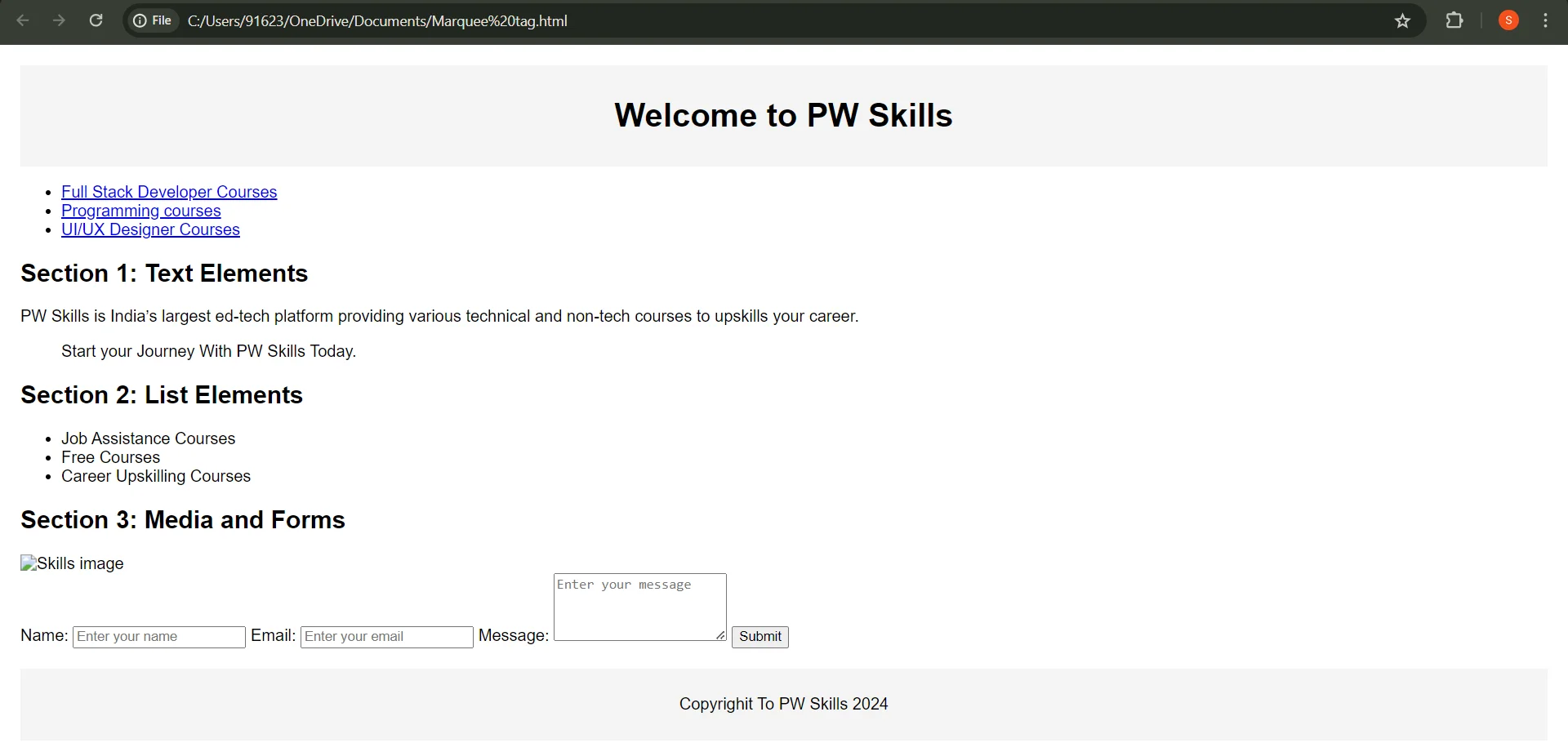
After understanding all the things in a theoretical way, you must be confused about how you can use these elements together to create an interactive and appealing web page. Don’t worry here is a simple HTML code example for you to understand the usage of all the elements and attributes used above-| HTML Elements Example |
| <!DOCTYPE html> <html lang="en"> <head> <meta charset="UTF-8"> <meta name="viewport" content="width=device-width, initial-scale=1.0"> <title>HTML Elements Example</title> <style> body { font-family: Arial, sans-serif; margin: 20px; } header, footer { background-color: #f4f4f4; padding: 10px; text-align: center; } section { margin: 20px 0; } img { max-width: 100%; height: auto; } </style> </head> <body> <header> <h1>Welcome to PW Skills</h1> </header> <nav> <ul> <li><a href= “Full Stack Developer Courses”>Full Stack Developer Courses</a></li> <li><a href="Programming Courses">Programming courses</a></li> <li><a href="UI/UX Courses">UI/UX Designer Courses</a></li> </ul> </nav> <section id="section1"> <h2>Section 1: Text Elements</h2> <p>PW Skills is India’s largest ed-tech platform providing various technical and non-tech courses to upskills your career. </p> <blockquote> Start your Journey With PW Skills Today. </blockquote> </section> <section id="section2"> <h2>Section 2: List Elements</h2> <ul> <li>Job Assistance Courses</li> <li>Free Courses</li> <li>Career Upskilling Courses</li> </ul> </section> <section id="section3"> <h2>Section 3: Media and Forms</h2> <img src="https://PWskills.com" alt="Skills image"> <form action="/submit" method="post"> <label for="name">Name:</label> <input type="text" id="name" name="name" placeholder="Enter your name" required> <label for="email">Email:</label> <input type="email" id="email" name="email" placeholder="Enter your email" required> <label for="message">Message:</label> <textarea id="message" name="message" rows="4" placeholder="Enter your message"></textarea> <button type="submit">Submit</button> </form> </section> <footer> <p>Copyrighit To PW Skills 2024</p> </footer> </body> </html> |
Output-
 |
Learn Web Development With PW Skills
Enroll in our comprehensive Classes for Full stack developer to learn principles, tools, and methodologies related to the full stack development. This beginner-friendly job assistance program starts by covering the foundational topics first and then gradually moves toward the advanced ones. The key features of this course that make it a standout choice among students include- Interactive expert-led live sessions, daily practice sheets, regular doubt-clearing sessions, 10+ practical projects, recognized certification after course completion, 100% Job assistance guarantee and much more. So what are you waiting for? Visit PWSkills.com today and book your seat now!



🔥 Trending Blogs
DOM in JavaScript FAQs
What are void elements in HTML?
Void elements are HTML elements that do not have closing tags. They are self-closing and do not contain any content. Examples include <img, <br, and .
What are global attributes in HTML?
Global attributes are attributes that can be applied to any HTML element. Examples include class, id, style, and title.
What is the difference between and , and ?
<b and <strong: Both are used for making the text bold, but <strong also indicates that the text is of strong importance.
<i and <em: Both makes the text italic, but <em also implies that the text is emphasized or has stress.


Talk to a counsellorHave doubts? Our support team will be happy to assist you!



Get Free Counselling Today
and Clear up all your Doubts
Talk to Our Counsellor just by filling out the form.
Join 15 Million students on the app today!
 Live & recorded classes available at easeDashboard for progress trackingLakhs of practice questions

