

HTML big Tag
The HTML big tag was used till HTML 4.01 to increase the size of the text placed within the tag by one level compared to the surrounding texts or phrases. Let us know more about the big tag.
 Varun Saharawat12 Nov, 2025
The HTML big tag is a simple HTML element used to increase a font size. It works only for the text that is contained within this tag, making the text bigger in appearance when compared to other surrounding texts.
The <big> tag was popular before CSS came into practice, as it made this tag outdated and is no longer supported in the latest version of HTML5. Here, let us learn more about the HTML big tag in detail.
The HTML big Tag
The HTML big tag is used to increase the size of the font in the HTML document by one level compared to the surrounding level of the text or phrases. When you place a text or phrase within the <big> tag in HTML, it increases its size, generally converted to an x-large element.
- The HTML big tag contains an opening tag <big> and a closing tag </big>
- The <big> tag in HTML can be used to highlight a part of the text, making it more appealing and noticeable.
- The <big> tag is no longer used in HTML documents, as you can use CSS to create larger text.
- There are many alternative ways to make text big i,e. Using heading tags or CSS (Cascading Style Sheets).
- A best practice is to use CSS for styling text sizes in HTML.
- The HTML big tag is supported on all major browser engines i,e. Chrome, Safari, Mozilla Firefox, Opera Mini, and more.
HTML big Tag Syntax
The syntax of the HTML big tag is simple; it uses the opening <big> tag and ends with a closing </big> tag. Check the simple representation below.| <big>.........</big> |
| <!DOCTYPE html> <html> <body> <p> This is a paragraph text without <big> tag. </p> <big> This is a text with big tag </big> </body> </html> |
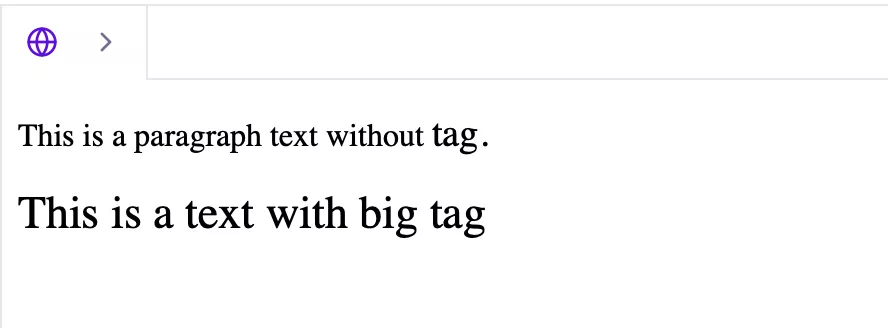 You can easily notice that the text enclosed within the <big> tag generally appears bigger than the normal paragraph (<p>) tag.
Attributes Supported with the HTML big Tag
The HTML big tag supports no special attributes other than the global attributes that are common to all elements.| Attribute | Description |
| id | The ID attribute specifies a unique ID for the element. |
| class | It is used to assign one or more class names for CSS styling or JavaScript. |
| style | Style adds inline CSS styling directly to the element enclosed within. |
| title | The title attribute adds extra information shown as a tooltip when hovering. |
| lang | The lang attribute specifies the language of the element’s content. |
| dir | It sets text direction i,e. Left to right or right to left. |
| hidden | It hides the element from view. |
| accesskey | It is used to specify a shortcut key to focus or activate the element. |
| tabindex | The tabindex attribute sets the tab order for keyboard navigation. |
| data-* | It adds custom data attributes for JavaScript. |
| contenteditable | This attribute is used to specify the element’s text editable by the user. |
Why the big Tag is Not Supported in HTML5?
The HTML big tag is no longer supported in the latest version of HTML5. The big tag got deprecated in HTML 4.01. The major reason for the removal of the <big> tag in HTML was that it does not contribute to the semantic meaning, rather only changes the visual appearance.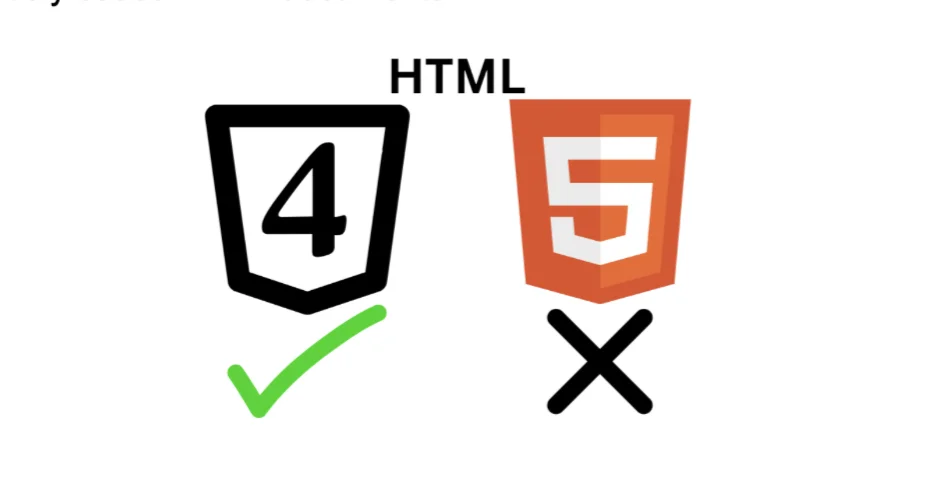
| This feature is no longer recommended. Though some browsers might still support it, it may have already been removed from the relevant web standards, may be in the process of being dropped, or may only be kept for compatibility purposes. Avoid using it, and update existing code if possible. |
- HTML5 is putting more focus on the semantic structure and meaning of elements in the HTML document.
- The <big> tag does not give any semantic value to the element.
- In HTML5, the use of CSS for styling and semantic elements for structuring is encouraged.
Using big tag
| <p>This is <big>big text</big>.</p> |
Using CSS
| <p>This is <span style="font-size: larger;">big text</span>.</p> |
Other Alternatives Despite the HTML big tag
| CSS | Using CSS styling and its attributes |
| <strong> | This tag is used with texts or phrases depicting stronger importance. |
| <em> | This is used for strong emphasis. |
| <h1>- <h6> | The heading tags are used to increase the size value based on the importance of the subheading |
Become a Master In Web Development With PW Skills
Master HTML fundamentals along with its tags with our Full Stack Web Development Course. Gain knowledge and real-world expertise of HTML, CSS, JavaScript, React, and other important elements of web development.Perks of Full Stack Web Development Course
- Build a strong portfolio for your resume, CV on LinkedIn, and more.
- Get complete career assistance from dedicated mentors at pwskills.com
- Gain doubt session support from industry experts 24x7.
- Master Frontend frameworks like HTML, CSS, React, JavaScript, and more.
- Get hands on training with capstone projects and practice exercises based on frontend development.
- Get the latest updated curriculum covered by dedicated mentors at pwskills.com, and regularly updated from time to time.
- Get industry recognised certificates from PW Skills and discover a wide range of opportunities in the design field.
- Get a complete hands on training with our real world capstone projects within this course.




🔥 Trending Blogs
HTML big Tag FAQs
Q1. What is the HTML big tag?
Ans: The HTML big tag is an element in HTML used to increase the size of a font, text, or phrase.
Q2. How to use the HTML big tag?
Ans: The HTML big tag can be defined by using the big tag. Everything enclosed within the big and big tags.
Q3. Which is better, or tag in HTML?
Ans: The strong tag only increases the size of the text enclosed inside.
Q4. Is the tag used in HTML5?
Ans: The big tag in HTML is deprecated after HTML 4.01 and is not used in HTML5, as it does not have any semantic benefits despite presentation.


Talk to a counsellorHave doubts? Our support team will be happy to assist you!



Get Free Counselling Today
and Clear up all your Doubts
Talk to Our Counsellor just by filling out the form.
Join 15 Million students on the app today!
 Live & recorded classes available at easeDashboard for progress trackingLakhs of practice questions

