Deployment of Cloud Computing in 2026: Methods, Models, Process and Best Practices

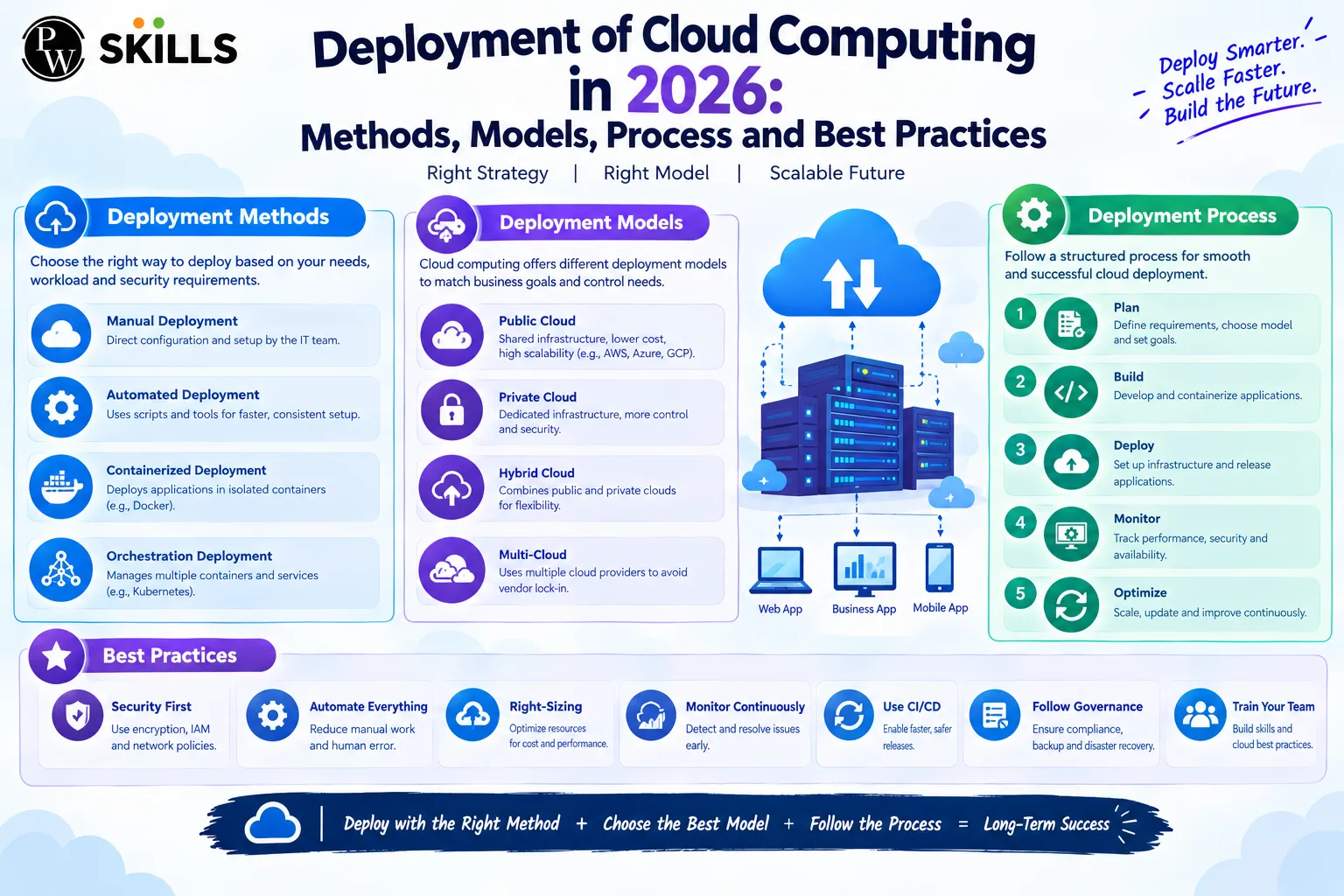
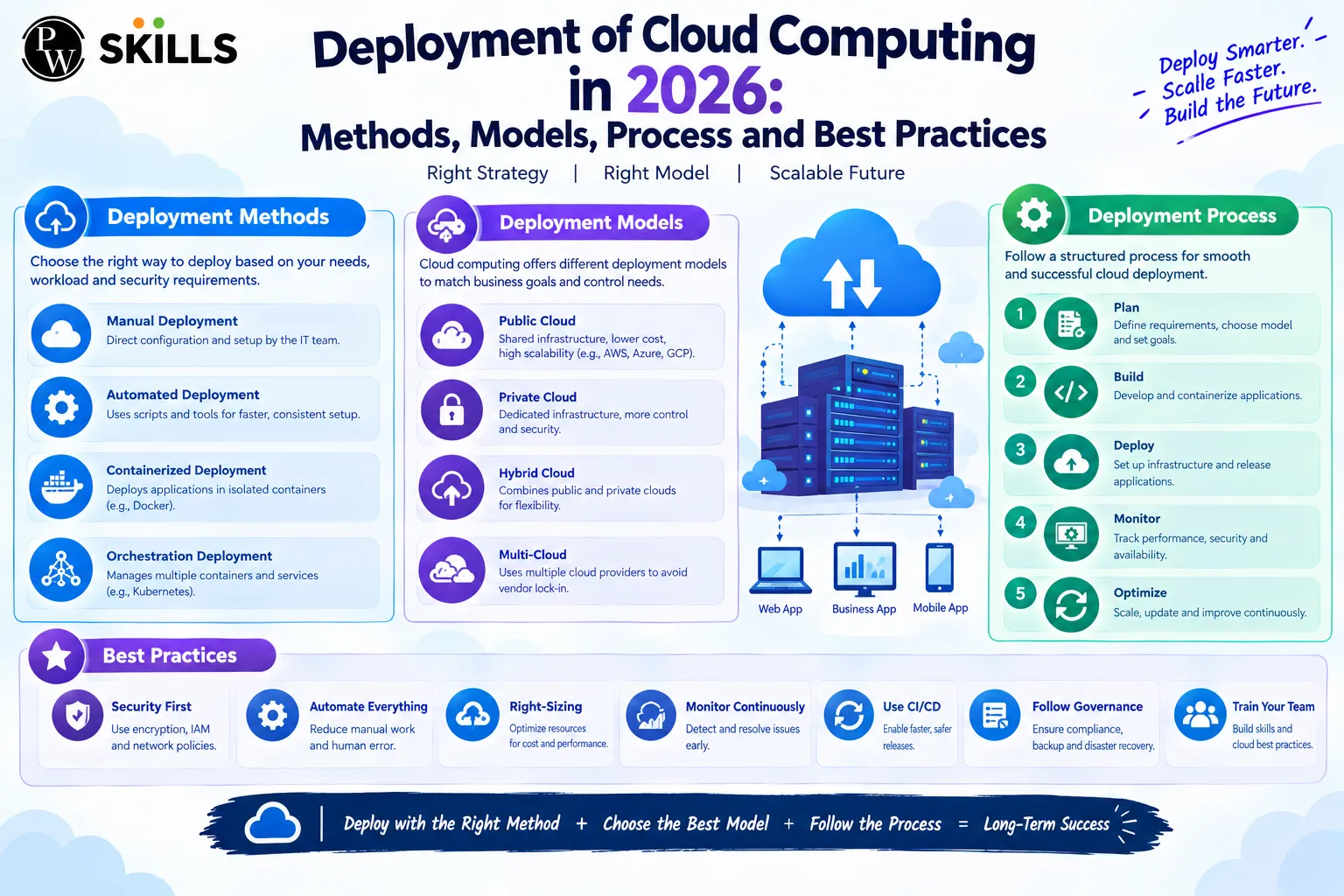
Moving workloads to the cloud involves more than simply transferring applications and data to remote infrastructure. Organisations need to consider how systems will be structured, secured, tested, and managed throughout the transition. deployment of cloud computing provides the framework for understanding how businesses approach this shift and how different deployment choices influence their technology environments.
Cloud adoption can also vary significantly based on an organisation’s infrastructure, operational requirements, and existing systems. Understanding the deployment process creates context for the different models and release approaches used when introducing cloud-based workloads into production environments.
Overview of Deployment of Cloud Computing
Moving software applications and databases to the cloud needs a clear, step-by-step approach. Without good planning, companies risk downtime, data loss, and surprise costs. A successful cloud rollout follows a specific process.
Planning is the foundation of any infrastructure change. Teams should review current apps, check their dependencies, and set performance goals. This helps prevent problems later in the project.
Provisioning means choosing virtual machines, storage, and the right network setup. Before moving live workloads, engineers set up security groups, access policies, and encryption keys.
The data migration is done incrementally over secure channels. For big data sets the transfers should be optimized for bandwidth to avoid service interruptions. We’re testing to ensure everything works, is fast enough, and that things fail gracefully when we’re busy.
- Phase One: Infrastructure assessment and workload auditing.
- Phase Two: Security baseline configuration and network setup.
- Phase Three: Incremental data migration and staging verification.
- Phase Four: Final cutover, performance monitoring, and optimization.
Why Is Cost Management Important in Deployment of Cloud Computing?
If organizations do not track their cloud usage in real time, costs can quickly get out of hand. Without strong financial controls, unused virtual machines and extra storage can lead to high monthly bills. Good cost management helps companies scale without breaking their budgets.
Organizations use tags to organize cloud costs by department, project, or environment. This helps teams to identify wasted resources more easily. Reserved instances and automated scaling also help reduce monthly spend.
- Resource Tagging: Categorizing infrastructure spending to track departmental usage accurately.
- Auto-Scaling Rules: Adjusting computing capacity dynamically to match actual traffic demands.
- Budget Alerts: Setting automated notifications to prevent unexpected financial overruns.
How Does the Deployment of Cloud Computing Shape Infrastructure?
Choosing the right setup affects how you manage, share, and protect your data. Each cloud deployment model has its own benefits, depending on your rules, budget, and scaling needs.
Public cloud environments share hardware between many users and are managed by outside providers. This option is very flexible and has low upfront costs. But companies with strict rules often need their own dedicated hardware.
Private cloud setups give one organization control over all computing resources. This gives maximum control over security and data management. However, the company handles most maintenance and needs skilled engineers.
|
Deployment Model |
Primary Advantage |
Typical Use Case |
|
Public Infrastructure |
Cost efficiency and rapid scalability |
Web applications and development staging |
|
Private Infrastructure |
Enhanced security and strict data isolation |
Financial institutions and healthcare databases |
|
Hybrid Architecture |
Flexibility and balanced workload distribution |
Enterprise systems requiring legacy integration |
Which Deployment of Cloud Computing Methods Work Best for Businesses?
A smooth release cycle depends on the release strategy you choose. Picking the right cloud deployment method helps avoid user issues and prevents downtime during updates.
Rolling updates gradually replace older versions of an application with newer ones. This approach keeps the service available at all times by gradually moving traffic to new nodes.
Blue-green strategies use two identical production environments at the same time. One handles live traffic, while the other gets the new software. Once tests show everything is stable, all traffic moves to the updated environment.
Canary releases send a small amount of user traffic to the new version of the app. Engineers watch for errors and slowdowns. If everything works well, the update goes out to everyone.
- Rolling Updates: Gradual instance replacement reducing resource strain.
- Blue-Green Architecture: Instant environment switching for zero downtime.
- Canary Testing: Controlled rollout targeting a subset of live users.
What Are the Main Security Risks in Deployment of Cloud Computing?
There are unique vulnerabilities when moving sensitive workloads if the right governance isn’t in place. When deploying cloud computing, there's a shared responsibility model, where the provider and customer have distinct security responsibilities.
Misconfigured storage buckets are still a top cause of accidental data leaks. Sometimes, administrators leave default access open, letting unauthorized people read internal databases. Strict access control lists help prevent this risk.
Data can be at risk both while moving and when stored if encryption is weak. Using strong encryption keeps intercepted data unreadable. Automated compliance tools can spot policy changes before a breach happens.
If identity management fails, stolen credentials can give attackers wide access to systems. Using multi-factor authentication and zero-trust policies means every request is carefully checked.
- Misconfigurations: Unsecured storage endpoints leaking internal records.
- Weak Encryption: Vulnerabilities during data transit across public networks.
- Identity Theft: Compromised administrative credentials bypassing perimeter defenses.
How Do Automation Tools Simplify Deployment of Cloud Computing?
Manual configuration introduces human error, often destabilizing production environments with major updates. “By harnessing automated tooling, we can remove repetitive tasks and speed software delivery cycles safely.
Infrastructure as Code frameworks allow developers to define environments in version-controlled configuration files. This guarantees the same setup in the production and staging clusters. Continuous integration pipelines automatically test code changes before they go to live servers.
- Configuration Scripts: Eliminating manual setup steps through repeatable templates.
- Continuous Integration: Automated testing catching bugs prior to production release.
- Version Control: Tracking infrastructure modifications to roll back faulty updates instantly.
How to Manage Public, Private, and Hybrid Deployment of Cloud Computing?
Combining multiple infrastructure environments creates complex management challenges. A public-private hybrid cloud setup allows organizations to run mission-critical databases internally while scaling web traffic dynamically through public servers.
Unified management dashboards provide centralized visibility of disparate environments. Automation tools can help you seamlessly orchestrate workloads, moving computing tasks based on real-time cost and performance indicators.
Dedicated high-speed links are needed between on-premises data centers and public providers. Secure virtual private networks provide robust communication channels that are immune to public-internet congestion.
- Centralized Monitoring: Single-pane-of-glass dashboards tracking resource utilization.
- Workload Orchestration: Automated placement rules balancing cost and speed.
- Secure Interconnects: Dedicated encrypted links bridging internal and external nodes.
What Are the Best Practices for Deployment of Cloud Computing?
To optimize performance and control spending, you need disciplined operational habits. Standardized guidelines ensure long-term stability and help to avoid unexpected budget overruns.
Infrastructure as Code tools use version-controlled configuration files to automate environment provisioning. This reduces manual configuration errors and ensures staging and production environments behave identically.
Regular monitoring and logging provide deep insights into your applications' health. Automated alerts can be configured for unusual traffic spikes or latency degradation to help you respond to incidents quickly.
- Infrastructure as Code: Version-controlled templates for repeatable environment builds.
- Automated Cost Tracking: Real-time budget alerts preventing cloud bill shock.
- Regular Backup Verification: Routine disaster recovery drills ensuring data restorability.




FAQs
What is the most important advantage of containerization in cloud environments?
How does cloud automation reduce operational complexity?
What are the reasons why cost monitoring is so important during large-scale migrations?
How do multi-region architectures enhance disaster recovery?
What is the function of API gateways in cloud applications?





Get Free Counselling Today
and Clear up all your Doubts
 Live & recorded classes available at easeDashboard for progress trackingLakhs of practice questions