HTML Formatting or HTML text formatting is a process of beautifying and enhancing the HTMl text elements. It helps format text appearance without using any CSS. There are many HTML formatting tags to help you format the appearance of your text on the web page.
These HTML formatting tags can help you make your text bold, underlined, highlight, strike, and much. In this tutorial, let us learn more about html formatting and tags which help make formatting possible in web development.
What are HTML Formatting Tags?
HTML Formatting elements or tags were designed to give a special appearance to the text. It is used to provide a better look and feel to the text without using CSS. We can use HTML text formatting to enhance the visual appeal of text and make the text appearance more attractive.
HTML text formatting provides plenty of formatting options where you can make your text bold, highlight the important part, change the size, decide the font style, and more.
Also, check What is the use of CSS in HTML for web development?
Types of HTML Text Formatting
There are two major types of HTML formatting used in web development.
- Logical Tags
- Physical Tags
Logical Tags
The logical html tags define the meaning and importance of the text without altering its visual appearance. These tags help browsers understand the purpose of the text. For example, <em> tag is used to render the enclosed text in italics and conveys that the text has special importance.
Physical Tags
The Physical tags conveys the appearance of the enclosed text on the web page. It alters the appearance of the text by changing its style, size and appearance.
For example, the <b> tag or bold tag is used to display the text in bold without highlighting its importance or semantic value. It just makes the appearance of the enclosed text thicker and more visible.
HTML Formatting Tags
There are many HTML text formatting tags available in the HTML which can be used anywhere on the web page. Know more about them below.
| HTML Formatting Tags |
Syntax |
| <b> |
<b>text</b> |
| <strong> |
<strong>text</strong> |
| <i> |
<i>text</i> |
| <em> |
<em>text</em> |
| <u> |
<u>text</u> |
| <strike> |
<strike>text</strike> |
| <mark> |
<mark>text</mark> |
| <tt> |
<tt>text</tt> |
| <sup> |
<sup>text</sup> |
| <sub> |
<sub>text</sub> |
| <del> |
<del>text</del> |
| <ins> |
<ins>text</ins> |
| <big> |
<big>text</big> |
| <small> |
<small>text</small> |
The bold text HTML formatting tags are used to enhance the visual appearance of the highlighted text. It makes the text more thicker and visible.
The <strong> tag is a logical html formatting tag with a semantic value and bold appearance. While the <b> tag is a physical tag which displays the text in bold font only with no logical message.
<b> Tag Example
| <p>This is a <b>bold</b> text example.</p> |
 Here, the text enclosed within the <b>..</b> tag “bold” is highlighted and appears in the bold font.
<strong> Tags Example
| <p>This is a <strong>strong</strong> text example.</p> |
 The <strong> tag not only makes the enclosed text bold but also adds to the semantic value of the highlighted text.
Italic Text HTML Formatting
There are two types of italic text, the physical italic text <i> only makes the text italic appearance while the <em> tag also adds to the semantic value of the text.
Italic <i> tag
| <p> <i>This paragraph is written in italic</i></p> |
 The complete text enclosed within the <i> tag is displayed in the italic font.
The <em> tag
The <em> tag also displays the highlighted content in italic format and it also adds to the semantic value of the text highlighting its importance.
| <p> <i>This paragraph is written in <em> italic with em tag </em></i></p> |

HTML Underlined Text Formatting
The underlined text is used to render the text with an underline below the text. It is sometimes used to make the important piece of a thin line or paragraph.
When you write anything within the <u>....</u> tag then the statement is shown as an underlined text.
| <p> <u> The given paragraph is underlined </u> </p> |

HTML Strike Text
This HTML formatting tag is used to strike pass a line or strike the displayed element. It is a thin line which crosses the displayed statement or sentence.
| <p> <strike> The given paragraph is striked</strike> </p> |

HTML Marked Formatting
The Marked text formatting is used to highlight a text with color to represent the importance of the piece of text or enclosed statement.
| <p> The <mark> Highlighted Text </mark>is of great importance.</p> |

HTML Monospaced Formatting
This tag is used to provide an equal width spacing between the texts. Monospaced formatting is used to provide equal or similar space between every letter in a sentence.
| <p> <tt>This sentence is written with monospaced formatting. </tt></p> |

HTML Superscript Formatting
This HTML tag is used to display the enclosed text in superscript format. In superscript text formatting a character is displayed half the height above the other character. It is generally used to represent the power expression in mathematics.
| <p> The 2 to the power 5 is written as 2 <sup>5</sup></p> |

HTML Subscript Formatting
This HTML tag is used to display the enclosed text in superscript format. In superscript text formatting a character is displayed half the height below the other character. It is generally used in logarithmic expressions.
| <p> The logarithmic Expression, log <sub>2</sub> (8) </p> |

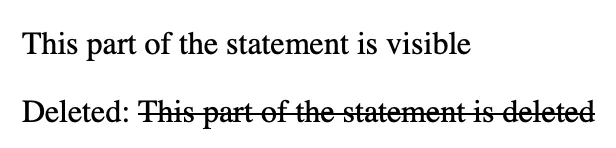
HTML Deleted Text Formatting
Any text or statement enclosed within the <del> tag is not rendered in the output. This is used to keep a part of the statement from rendering on the live web page.
| <p> This part of the statement is visible</p>
<p> Deleted: <del>This part of the statement is deleted </del></p> |
HTML Inserted Text
When you want to insert any extra statement or text within a displayed text then you can use the Inserted text tag available in HTML.
| <p>This part of the sentence was already available in the statement. <ins>The given paragraph is inserted in the sentence.</ins></p> |

HTML Larger Text
The larger text in HTML formatting is used to display a text or part of a sentence in a larger size text than the rest of the text displayed on the web page. We use <big> tag to make the text appear large in HTML page.
| <p> The given statement is regular size. <big>This is a large sized text.</big></p> |

HTML Smaller Text
The smaller text in HTML formatting is used to display a text or part of a sentence in a smaller size text than the rest of the text displayed on the web page. We use <small> tag to make the text appear large in the HTML page.
| <p> The given statement is regular size. <small>This is a small sized text.</small></p> |

Learn Web Development with PW Skills
Build a shining career in web development with PW Skills 6 months Full Stack Web Development Course. The course is specially prepared for anyone who wants to make a career as a full stack web developer. Learn everything about web development from scratch and based on an industry oriented curriculum.
This job assistance program provides you with real world projects, practice exercises, module level assignments, and more under the guidance of expert mentors. Get your certificate after completing the course and become a certified web developer only with pwskills.com


 Varun Saharawat30 Oct, 2025









 Live & recorded classes available at ease

