

What Is HTML Link Tag - A Complete Guide
HTML Link tag is used to define the relationship between the current document and the external source. Read this comprehensive guide to understand HTML link tag in detail including their- uses, syntax, advantages, types, and much more.
 Varun Saharawat30 Oct, 2025
Have you ever wondered about how hyperlinks are created on different websites? It is all made possible with the help of HTML link tag. This fundamental component of web development basically makes it easy for users to navigate between web pages and resources.
In this detailed guide, we will explore everything you need to know about the HTML link tag, from its basic syntax to advanced usage. Reading this article will help you to implement and customize hyperlinks effectively in your web projects.
What Is The HTML Link Tag
The HTML link tag is a basic element used to create hyperlinks on web pages. When you see text or an image on a website that you can click on to go to another page or website, that's a hyperlink. The HTML link tag, also known as the anchor tag, is what makes this possible. It connects web pages together which allows users to navigate from one page to another easily. Let us look below and understand the basic syntax of this tag.HTML Link Syntax
The HTML link syntax for creating a hyperlink is quite simple and straightforward. It uses the `<a>` tag to define a hyperlink. Inside the `<a>` tag, you include an `href` attribute that specifies the URL of the page or resource you want to link to. Here’s a simple example: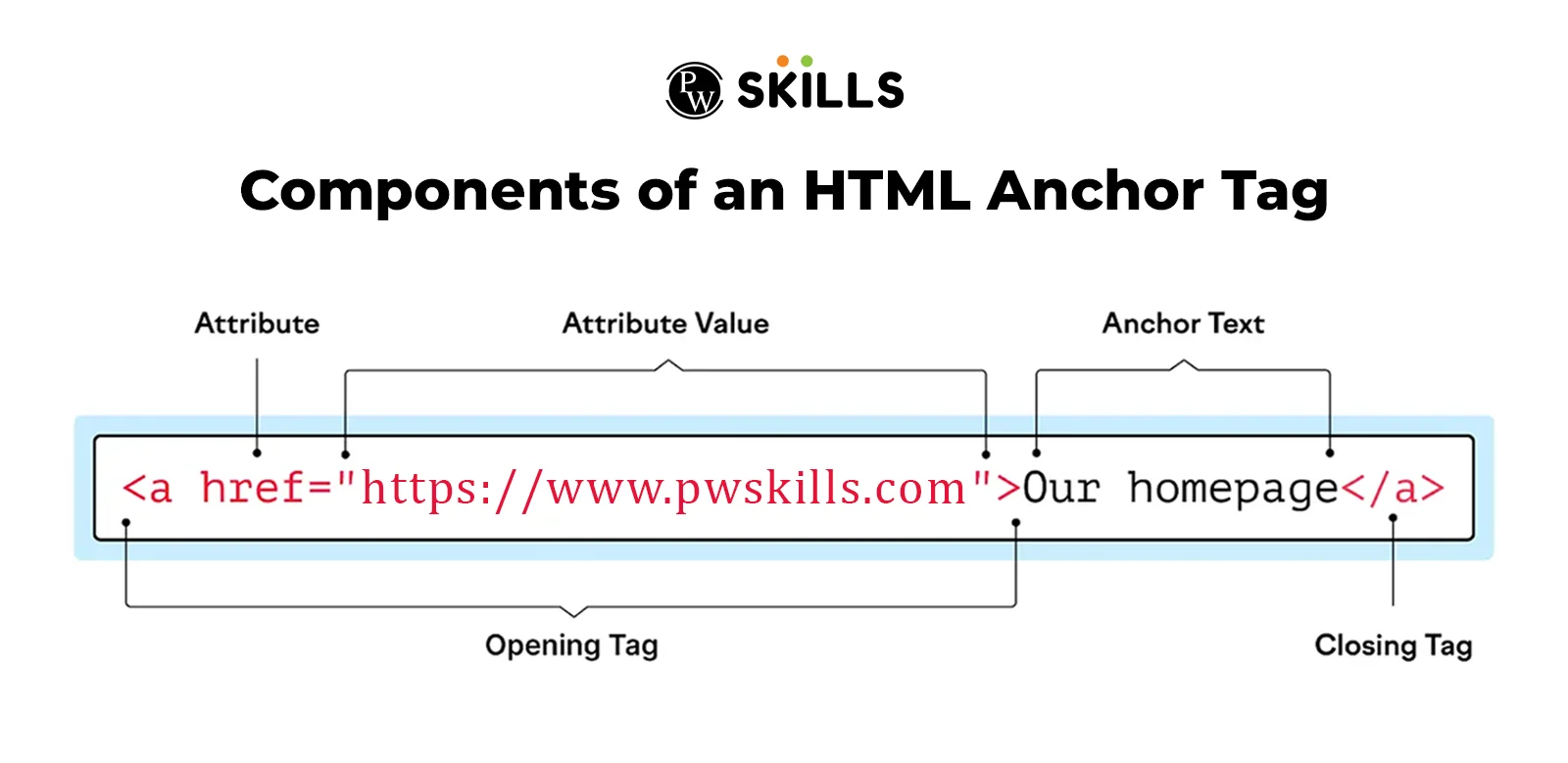 When users click on "Our homepage," they will be taken to `https://pwskills.com`. This simple structure is the foundation of creating links in HTML.
Types Of HTML Links
In HTML, links are used to connect one web page to another or different sections within the same web page. There are several types of HTML links that are commonly used in day-to-day life, let us understand each one of them in detail below:- Internal Links
- External Liks
- Anchor Links
1. Internal Links
These are the links that connect different sections or pages within the same website. Clicking on a link in the navigation bar that takes you to the "About Us" section on the same webpage is an example of internal linking.2. External Links
As specified from the name, they are opposite to internal links. These links direct users to a different website or domain. Clicking on a link that takes you to a new article on a different web page is a common example of an external link.3. Anchor Links
These links navigate users to specific sections or anchors within the same webpage. For example- Suppose you are reading a long article and you reach the bottom of the article, now instead of going back manually you can click on the anchor link provided below to go back to the top within seconds.HTML Link Attributes
HTML link attributes basically provide additional information about how links will behave or where they will point. These attributes also help in controlling things like the link's destination, how it will open, its relationship with other resources, and language. We have explained below some of the commonly used HTML link attributes that will help you to understand the concept better.1. Href Attribute:
The `href` attribute is responsible of defining the web address (URL) where the link goes. It's like a map that tells your browser where to go, when you click the link. For example, `href="https://pwskills.com"` takes you to the skills website.2. Target Attribute:
The `target` attribute tells the browser where to open the link when it's clicked. It controls if the link should open in the same tab or in a new tab. The basic target attribute that are commonly used in web development is given in the table below:| HTML Link Attributes | |
| Attribute | Description |
| _blank | It is used for opening the link into a new tab or window. |
| _self | It is used for opening the linked document in the same tab. |
| _parent | It generally opens the document in the parent frame. |
| framename | It opens the document in the specified frame. |
3. Rel Attribute
The `rel` attribute defines the relationship between the linked document and the current document. For example, `rel="nofollow"` tells search engines not to follow the link for ranking purposes, while `rel="noopener"` ensures that any security vulnerabilities are minimized when opening new tabs or windows.4. Hreflang Attribute
The main purpose of `hreflang` attribute is to define the language of the linked document. Using this attribute helps search engines and browsers to understand which language version of a page to show users. For example, `hreflang="en"` indicates that the link leads to an English language page.Styling HTML Link Using CSS
Styling HTML link using CSS allows you to customize their appearance to match your website's design. You can change the colors of the links, remove underlines, and add effects when users hover over them. Now, the common question coming to your mind is, how is this all possible? so, let us dive more deeper and understand the implementation of each one of them1. Changing link colors
You can use the `color` property in CSS to change the color of the links. Example- ‘a { color: blue; }’ changes the link color to blue. Not only this, you can specify any color using color names, hex codes (`#RRGGBB`), or RGB values (`rgb(255, 0, 0)`).2. Removing underlines
Html link have default underlines to indicate that they are clickable. Now, To remove these underlines, you can use the `text-decoration` property with the value `none`. Example: ‘a { text-decoration: none; }’ removes the underline from all links.3. HTML Link Hover Effect
HTML link hover effect is useful to make your website attractive and engaging, these effects generally make links change their appearance when a user moves his cursor over them. Let us understand it better with the help of an example that changes the link color to red and underlines it when the user hovers over it.| Styling HTML Link Using CSS [HTML Link Hover Effect Syntax] |
| a:hover { color: red; /* Changes text color to red on hover */ text-decoration: underline; /* Underlines the text on hover */ } |
Uses Of HTML Link Tag
Adding HTML links to a website is beneficial because they:- Improve Navigation: Links help users easily navigate between pages and sections of a website.
- SEO Consideration: Search engines like Google use links to discover new pages on websites. When one-page is linked to another, it tells search engines that the linked page is important or relevant. This helps improve the website's visibility in search results.
- Makes WebSite Attractive: Instead of using common phrases like "click here" or "read more," it's better to use descriptive text that indicates the purpose and destination of the link. This approach helps all users to surf your website easily while navigating to different pages within seconds.
Example Of HTML Link
As we have understood everything till now, for more clarity of concept let us dive more deeper into the example of the syntax defining how you can create different types of links and can use hover effects in them. Let us look at the code below and understand it in a better way.| Detailed Example Of HTML Link |
| <!DOCTYPE html> <html lang="en"> <head> <meta charset="UTF-8"> <meta name="viewport" content="width=device-width, initial-scale=1.0"> <title>Welcome To PW Skills</title> <style> body { font-family: Arial, sans-serif; background-color: #f0f0f0; /* Light grey background */ color: #333; /* Dark grey text color */ margin: 0; padding: 0; } h2 { background-color: #007bff; /* Blue background for title */ color: #fff; /* White text color */ padding: 10px; text-align: center; } p { margin-bottom: 15px; } a { color: #007bff; /* Blue link color */ text-decoration: none; } a:hover { text-decoration: underline; /* Hover effect installation */ } </style> </head> <body> <h2>Welcome To PW Skills</h2> <!-- External link to a PW skills article --> <p><a href="https://www.PWskills.com/" target="_blank" rel="noopener noreferrer">PW Skills Site (External)</a></p> <!-- Internal link to a specific PW skills page --> <p><a href="https://pwskills.com/web-development/full-stack-web-development-course//">Full Stack Development Course</a></p> <!-- Anchor link within the same page to a PW skills section --> <p><a href="#contact">Contact for PW Skills Support</a></p> <!-- Email link to contact for PW skills coaching --> <p><a href="mailto:sahil.chikara@pw.live">Contact for PW Skills Support</a></p> <p><a href="https://www.example.com/pw-skills-resources" target="_blank" rel="noopener noreferrer" title="Explore PW Skills Resources">Explore PW Skills Resources</a></p> </body> </html> |
Output-
The sample output that will return after running this code will be something like as shown below-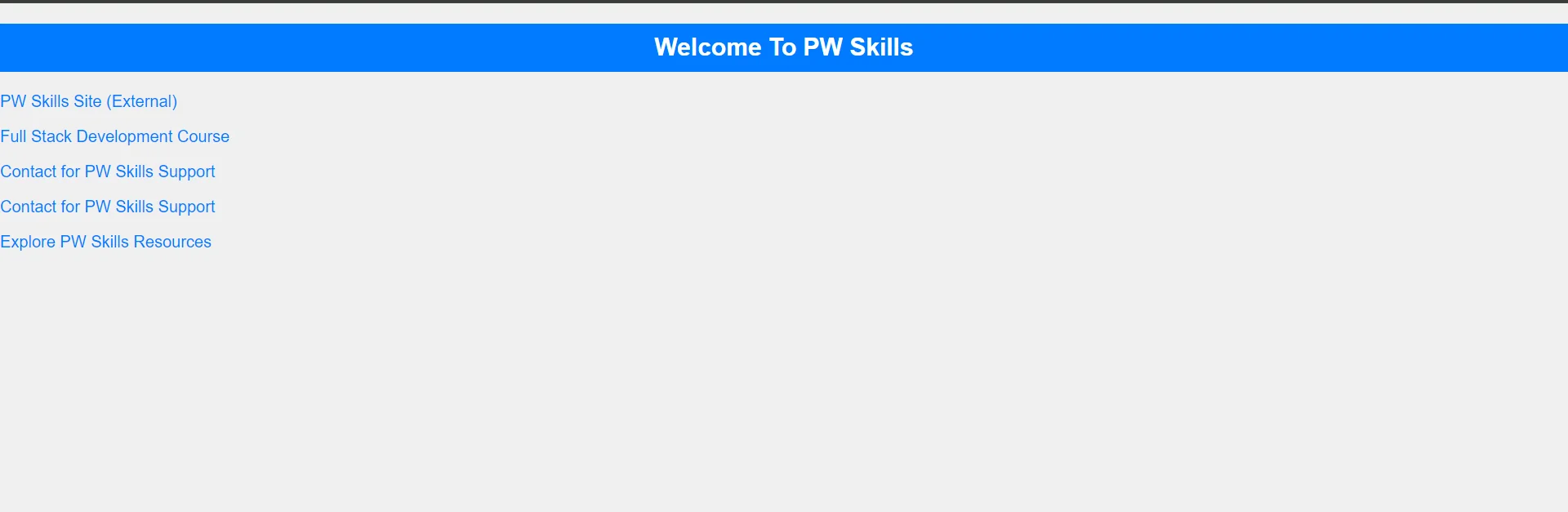
HTML Link Hover Effect-
You can see in the above screenshot that there is no underline in any of the links, but as soon as the user takes the cursor over any link the link will be underlined and it will show the descriptive link in the bottom right corner where the user will go after clicking on that text.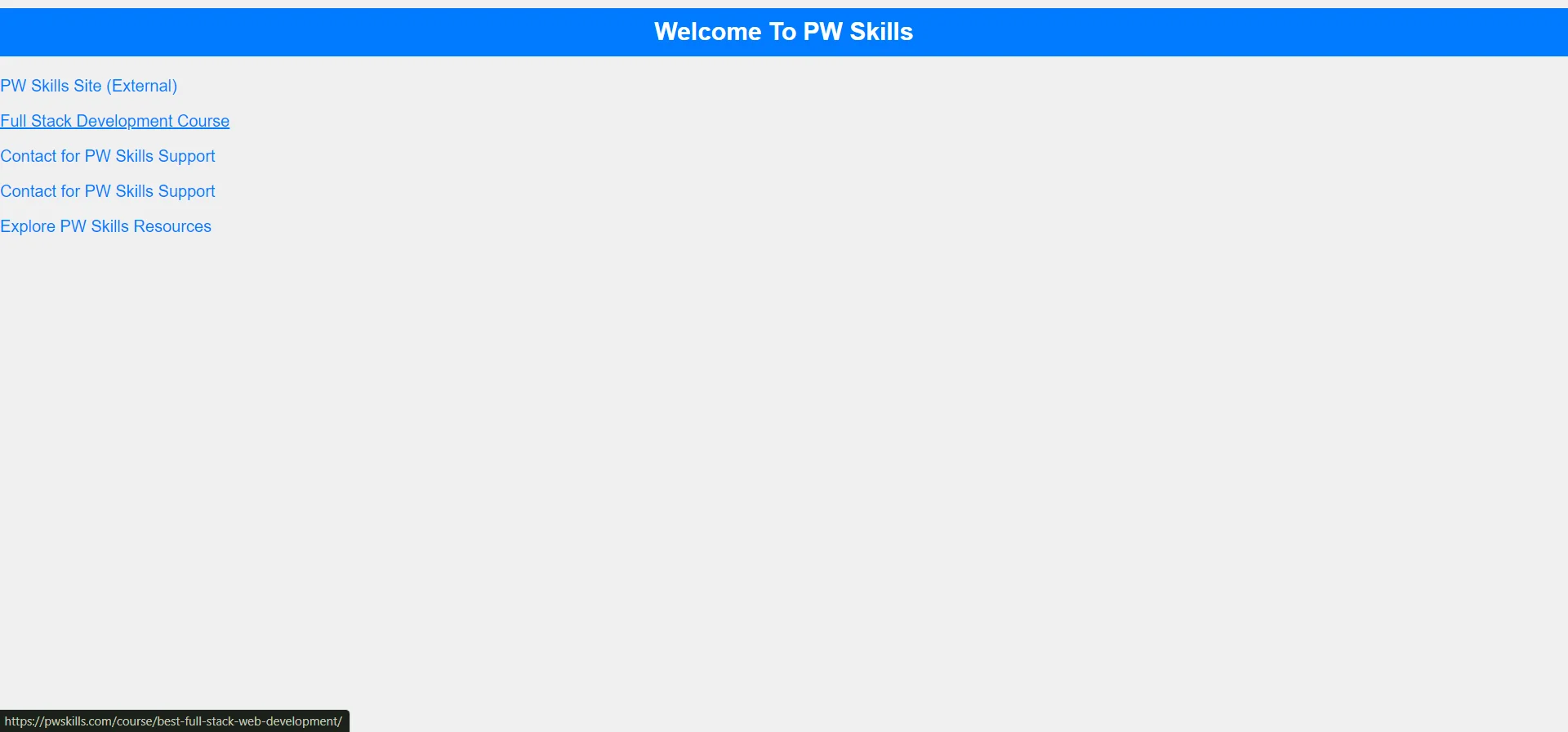 These are the styling effects that you can add to links. You can even change the link color and font. I have taken a blue color here, you can refer to the above-detailed code and change it as per your requirement.
Learn Full Stack Development With PW Skills
If you are looking to start your career as a full-stack developer then join our Full Stack Development Course to learn full-stack development with interactive live classes and industry-relevant practical experience. Get 200+ hours of learning from experienced instructors, regular doubt-solving sessions, daily assignments, a job assistance guarantee, and more only on pwskills.com.Also Read:




🔥 Trending Blogs
HTML Link FAQs
How do you open a link in a new tab or window?
To open a link in a new tab or window, add the target="_blank" attribute to the anchor tag. This attribute instructs the browser to open the link in a new browsing context.
Can you nest links in HTML?
No, HTML does not allow nesting of link tags. Each link should be a standalone element with its own opening and closing tags.
What are some best practices for writing effective anchor text?
Anchor text should be descriptive and relevant to the linked content. It should provide users with a clear indication of what they can expect when they click the link. Avoid using generic phrases like "click here" or "read more."


Talk to a counsellorHave doubts? Our support team will be happy to assist you!



Get Free Counselling Today
and Clear up all your Doubts
Talk to Our Counsellor just by filling out the form.
Join 15 Million students on the app today!
 Live & recorded classes available at easeDashboard for progress trackingLakhs of practice questions

