

HTML base Tag
The HTML base tag is used to specify the base URL that can be used for all relative URL paths on a webpage, making the code more consistent and easier to maintain. Let us know more about the HTML base tag here.
 Varun Saharawat4 Nov, 2025
You can make use of the HTML base tag when you have to specify a default target without adding a specific anchor tag for each element in the HTML document. This makes it easy to manage a lengthy and complex project.
Having a <base> tag in the HTML document keeps your code consistent and easier to maintain. It gives a starting point for all major relative paths like <a>, <link>, <img>, <script>, and more. Here, we will learn how to use the HTML base tag, its syntax, and usage in detail.
HTML base Tag: Key Characteristics
You can use the HTML base tag to specify a base URL or a default target for all links on a page. This becomes particularly important when you have many links that share the same base path. You only have to use the relative paths in your code. The <base> tag in HTML can be used to specify all relative links, such as <img>, <a>, <link>, <script>, and more.
- The HTML base tag can be defined using the <base> tag.
- You can only have one <base> element in an HTML document.
- The HTML base tag must have either an href or a target attribute or both, inside.
- The <base> tag must only be kept inside the <head> element in the HTML document.
- The HTML <base> tag is supported on all modern browsers, including Chrome, Safari, Firefox, Opera Mini, and more.
- The HTML base tag supports both Global attributes.
- In the HTML base tag, data: and javascript: URLs are not allowed.
- There is no default setting for the HTML base tag.
The HTML base Tag Syntax
 In HTML, the <base> tag can be defined using the simple <base> tag. It is a self-closing tag and consists of the target or href attribute inside.
| <base href = “URL” target= “_blank”> |
HTML base Attributes: href & target
- The HTML base tag does not support any event attribute.
- You can use global attributes like id, class, etc, with the HTML <base> tag.
1. href
The href attribute specifies the base URL that is to be used throughout the HTML document for relative URLs. This URL will be used by all relative URLs on the webpage.| <base href= “URL” |
Read More: HTML address tag: Syntax, Components, Attributes, And Examples [2025]
2. target
The target attribute in the <base> tag is used to specify where to open the target URL.| Target Attribute | Description |
| _self(default) | The self attribute link in the same tab or window where it was clicked. |
| _blank | It opens the link in a new tab or window. |
| _parent | It opens the link in the parent frame (the frame that contains the current frame). |
| _top | The _top attribute opens the link in the topmost frame (the full browser window). |
When to use HTML base Tag?
The HTML <base> tag is placed under the <head> tag in an HTML document. It can be used when you have many relative URLs on a page. Having a <base> tag helps you keep your code managed and avoid repeating long paths in every link. The <base> tag also helps you set a default target, which tells how links open in a specific way. However, if your webpage has multiple base paths on one page, only the first <base> tag works. Also, when your page uses absolute URLs everywhere on the webpage, the <base> tag has no effect.Read More: HTML area Tag: Syntax, Example, And Attributes
How to Set a Base URL?
The base tag setup code looks like the following, given below.| <DOCTYPE! html> <html> <head> <title>HTML base Tag </title> <base href= “https://pwskills.com” /> </head> <body> <img src = “ /images/logo.png” /> </body> </html> |
1. Setting default target for Links
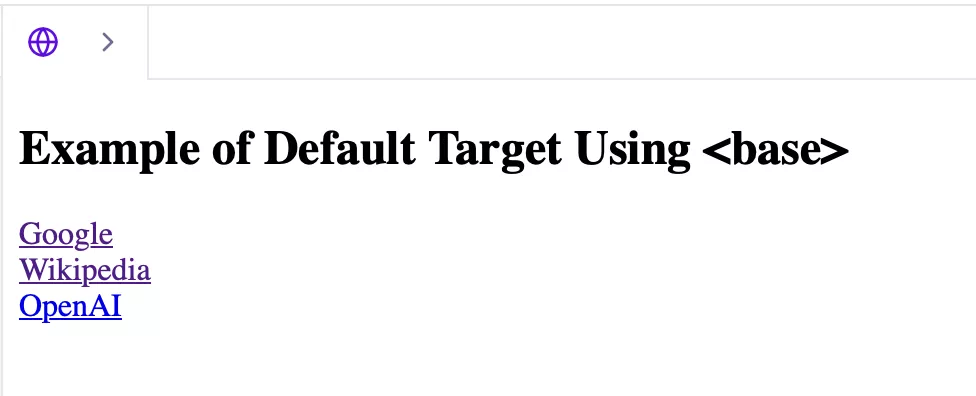
You can set different default targets for the links present in the main document page.| <!DOCTYPE html> <html> <head> <base target="_blank"> </head> <body> <h2>Example of Default Target Using <base></h2> <a href="https://www.google.com">Google</a><br> <a href="https://www.wikipedia.org">Wikipedia</a><br> <a href="https://www.openai.com">OpenAI</a> </body> </html> |
2. Setting Base URL for Multiple Links
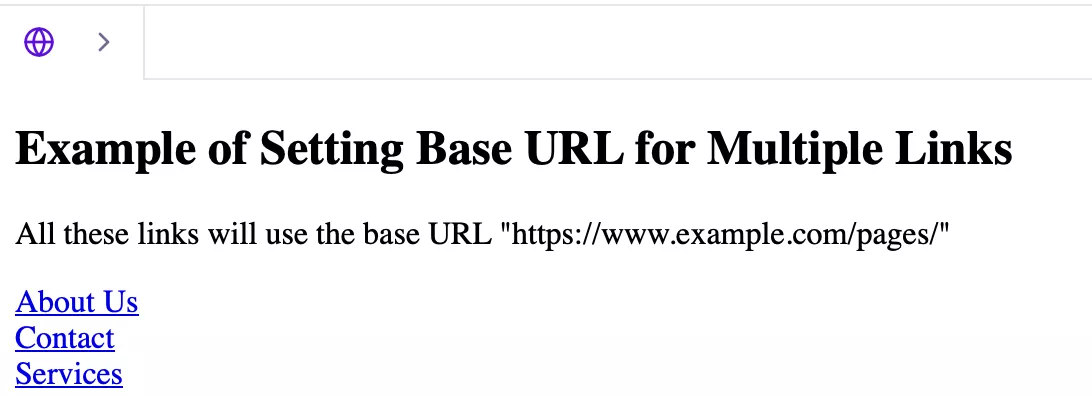
Here, we are going to take the base URL, which all other relative URLs will consider as the starting URL, and open it in the same window.| <!DOCTYPE html> <html> <head> <!-- Set the base URL and default target --> <base href="https://www.example.com/pages/" target="_self"> </head> <body> <h2>Example of Setting Base URL for Multiple Links</h2> <p>All these links will use the base URL "https://www.example.com/pages/"</p> <a href="about.html">About Us</a><br> <a href="contact.html">Contact</a><br> <a href="services.html">Services</a> </body> </html> |
Master Complete HTML With PW Skills
Become a master of the complete HTML fundamentals, tags, and build your portfolio with real world projects, assessments, and more in the PW Skills Full Stack Web Development Course. Master HTML, CSS, JavaScript, React, SQL, and more. Get doubt support sessions, industry led professional sessions, project portfolio, career assistance, and industry skills. After completion, you will get an industry recognised certification by PW Skills to level up your game in web development and gain exposure.Perks of Full Stack Web Development Course
- Make a strong portfolio for your resume, CV on LinkedIn, and more.
- Get complete career assistance from dedicated mentors at pwskills.com
- Master Frontend frameworks like HTML, CSS, React, JavaScript, and more.
- Get hands on training with capstone projects and practice exercises based on frontend development.
- Get the latest updated curriculum covered by dedicated mentors at pwskills.com, and regularly updated from time to time.
- Get industry recognised certificates from PW Skills and discover a wide range of opportunities in the design field.
- Get a complete hands on training with our real world capstone projects within this course.
Master Complete HTML With PW Skills
Become a master of the complete HTML fundamentals, tags, and build your portfolio with real world projects, assessments, and more in the PW Skills Full Stack Web Development Course. Master HTML, CSS, JavaScript, React, SQL, and more. Get doubt support sessions, industry led professional sessions, project portfolio, career assistance, and industry skills. After completion, you will get an industry recognised certification by PW Skills to level up your game in web development and gain exposure.Perks of Full Stack Web Development Course
- Make a strong portfolio for your resume, CV on LinkedIn, and more.
- Get complete career assistance from dedicated mentors at pwskills.com
- Master Frontend frameworks like HTML, CSS, React, JavaScript, and more.
- Get hands on training with capstone projects and practice exercises based on frontend development.
- Get the latest updated curriculum covered by dedicated mentors at pwskills.com, and regularly updated from time to time.
- Get industry recognised certificates from PW Skills and discover a wide range of opportunities in the design field.
- Get a complete hands on training with our real world capstone projects within this course.




🔥 Trending Blogs
HTML Base Tag FAQs
Q1. What is the HTML base tag?
Ans: The HTML base tag is used to define a base or default URL for relative URLs on the webpage. It tells your webpage where to start when opening a link, image, or other files.
Q2. How to use the base tag in HTML?
Ans: You can define the HTML base tag using the syntax.
Q3. What is the use of the base tag in HTML?
Ans: The base tag in HTML sets the default target for all links on the webpage that follow a relative path. This helps simplify the code maintenance and ensure overall consistency.
Q4. What is the base code in HTML?
Ans: The base code in HTML signifies the base URL to be used for all relative URLs in a document. In an HTML document, there can only be one element.


Talk to a counsellorHave doubts? Our support team will be happy to assist you!



Get Free Counselling Today
and Clear up all your Doubts
Talk to Our Counsellor just by filling out the form.
Join 15 Million students on the app today!
 Live & recorded classes available at easeDashboard for progress trackingLakhs of practice questions

