

CSS Properties - Complete Reference
CSS properties are used to decorate your web page and assign a unique behavior to your HTML element. Read here to learn different CSS properties with their implementation.
 Varun Saharawat30 Oct, 2025
Have you ever wondered about what makes web pages attractive and visually appealing? You must have seen many appealing and unique web pages and the main thing responsible for making them interactive are various CSS properties.
If you are the one who is not well familiar with these CSS properties, then this article is the right place for you. Read below to learn about various CSS properties and their syntaxes that will help you to make your own unique web page.
What Is CSS?
CSS, or Cascading Style Sheets, is a language used for styling and designing how a web page looks. With CSS, you can change the colors, fonts, layout, and overall appearance of a website to make it more attractive. CSS is an essential part of web development process as it is the way to make your web page look nice and organized. It works together with HTML to enhance the overall look and feel of your page. For example, if you want your text to be blue and the background to be white, you would use CSS to make those changes.CSS Properties
CSS properties are like instructions that tell HTML elements inside a web page about how it should look. They control different parts of the page, such as colors, fonts, sizes, and spacing. For example, if you want to make text bigger, change its color, or add a border around an image, you will use CSS properties to do that. Each property has a specific name and a value that you use to make changes. It's a simple way to customize the look and feel of a website. Some of the commonly used CSS properties and their uses are listed below in the table for your reference.| CSS Property | Use |
| color | Used for changing the text color. |
| background-color | Sets the background color of an element. |
| font-size | Adjusts the size of the text. |
| font-family | Changes the style of the font |
| margin | Adds space outside an element. |
| padding | Adds space inside an element, around the content. |
| border | Adds a border around an element. |
| text-align | Align text to the left, center, or right side. |
| width | Sets the width of an element. |
| height | Sets the height of an element. |
| display | Controls how an element is displayed like in a block or inline. |
CSS Property Example
Now, to understand this in a better way here is a detailed example of a CSS property explaining how different properties are combined together to make an attractive and appealing product.| CSS Property Example |
| <!DOCTYPE html> <html lang="en"> <head> <meta charset="UTF-8"> <meta name="viewport" content="width=device-width, initial-scale=1.0"> <title>PW Skills Example Of CSS Properties</title> <style> /* Set the background color of the entire page */ body { background-color: #f0f8ff; font-family: Arial, sans-serif; margin: 0; padding: 0; } /* Style the header */ header { background-color: #4caf50; color: white; text-align: center; padding: 20px; } /* Style the main content section */ main { padding: 20px; margin: 20px; background-color: #ffffff; border: 1px solid #ccc; width: 80%; margin-left: auto; margin-right: auto; } /* Style the main heading */ h1 { font-size: 2em; text-align: center; color: #333; } /* Style the paragraph */ p { font-size: 1.2em; color: #666; text-align: justify; } /* Style an image with a border */ img { display: block; width: 100%; height: auto; margin: 20px auto; border: 5px solid #4caf50; } /* Style the footer */ footer { background-color: #333; color: white; text-align: center; padding: 10px; position: fixed; width: 100%; bottom: 0; } </style> </head> <body> <header> <h1>Welcome to PW Skills Blogs</h1> </header> <main> <h2>About This Page</h2> <p>This is a simple example of how to use various CSS properties to create a nicely styled web page. The page includes a header, a content section, and a footer, all styled with different properties.</p> <h2>Image Example</h2> <img src="PW.jpeg" alt="skills logo"> <p>We have used properties like <strong>color</strong> to change text colors, <strong>background-color</strong> to set the background, <strong>margin</strong> and <strong>padding</strong> to control spacing, and <strong>border</strong> to add borders around elements.</p> </main> <footer> Connect with PW Skills on various social media platorms </footer> </body> </html> |
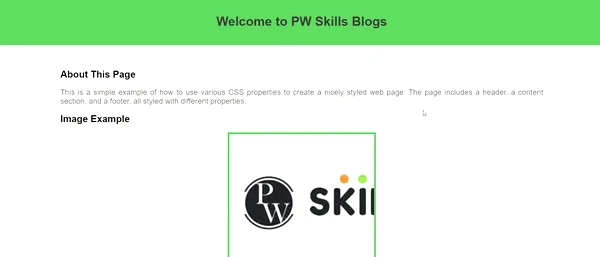 CSS Properties Example[/caption]
Benefits of CSS Properties
CSS properties offer many benefits and advantages for web development.- Control Over Appearance: CSS allows you to control how elements will look on a webpage. You can set colors, fonts, borders, and spacing, which helps you to create attractive and consistent designs.
- Separation of Content and Design: CSS has various types and features, By using various CSS types the design is kept separate from the content. This makes it easier to update the design without touching the actual content or functionality.
- Responsive Design: CSS is essential for making websites look good on different devices like phones, tablets, and computers. It includes tools like media queries, flexbox, and grid layout that help in adjusting the layout to fit different screen sizes.
- Efficiency and Consistency: External CSS helps you to style many elements at once, so you don’t have to repeat the same code over and over again. It also uses inheritance and cascading rules to keep styles consistent across your website.
- Easy to Maintain: If you need to change the design, you can do it in one CSS file, and the changes will automatically apply to all related pages. This saves your time and ensures that the design is consistent across the pages.
- Animation and Interactivity: CSS is not just for static designs; it can also add movement and interactivity. You can use CSS to create animations, transitions, and effects that make your website more engaging.
- Works on All Browsers: CSS is designed to work consistently across different web browsers which ensures that your site looks the same whether it’s viewed on Chrome, Firefox, or any other browser.
Learn CSS With PW Skills
Master the essential concepts of web development like- HTML, CSS, and Javascript by enrolling in our comprehensive Classes for Full stack Developer. Learn the major fundamentals of front-end and back-end development with advanced tools, in-depth tutorials and engage in real life projects with industry experts only at pwskills.com



🔥 Trending Blogs
CSS Properties FAQs
How do media queries work with CSS properties?
Media queries allow you to apply CSS properties conditionally based on the screen size or device type. This is essential for creating responsive designs that adapt to different devices, such as desktops, tablets, and smartphones.
How can I animate CSS properties?
CSS properties can be animated using the transition or animation properties. Transition allows smooth changes from one state to another. like changing color when hovering and much more.
What is the difference between padding and margin in CSS?
Padding is the space between the content inside an element and its border, while the margin is the space outside the border, between the element and its surrounding elements. Both are used to create space but affect different areas around the element.


Talk to a counsellorHave doubts? Our support team will be happy to assist you!



Get Free Counselling Today
and Clear up all your Doubts
Talk to Our Counsellor just by filling out the form.
Join 15 Million students on the app today!
 Live & recorded classes available at easeDashboard for progress trackingLakhs of practice questions

