

How to Learn Editing in 2026: A Step-by-Step Roadmap for Beginners
 Hardik Gupta28 Sept, 2026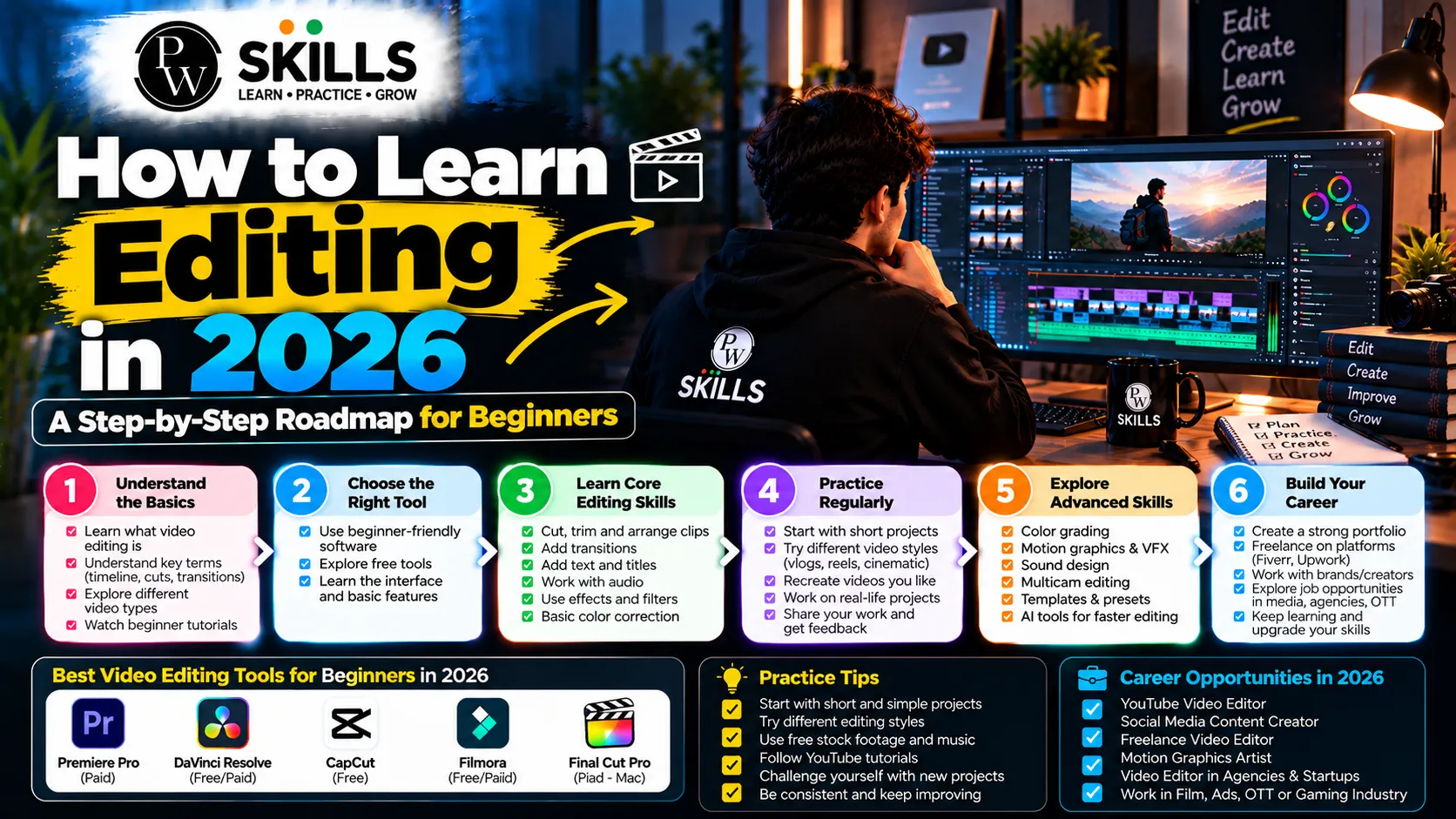
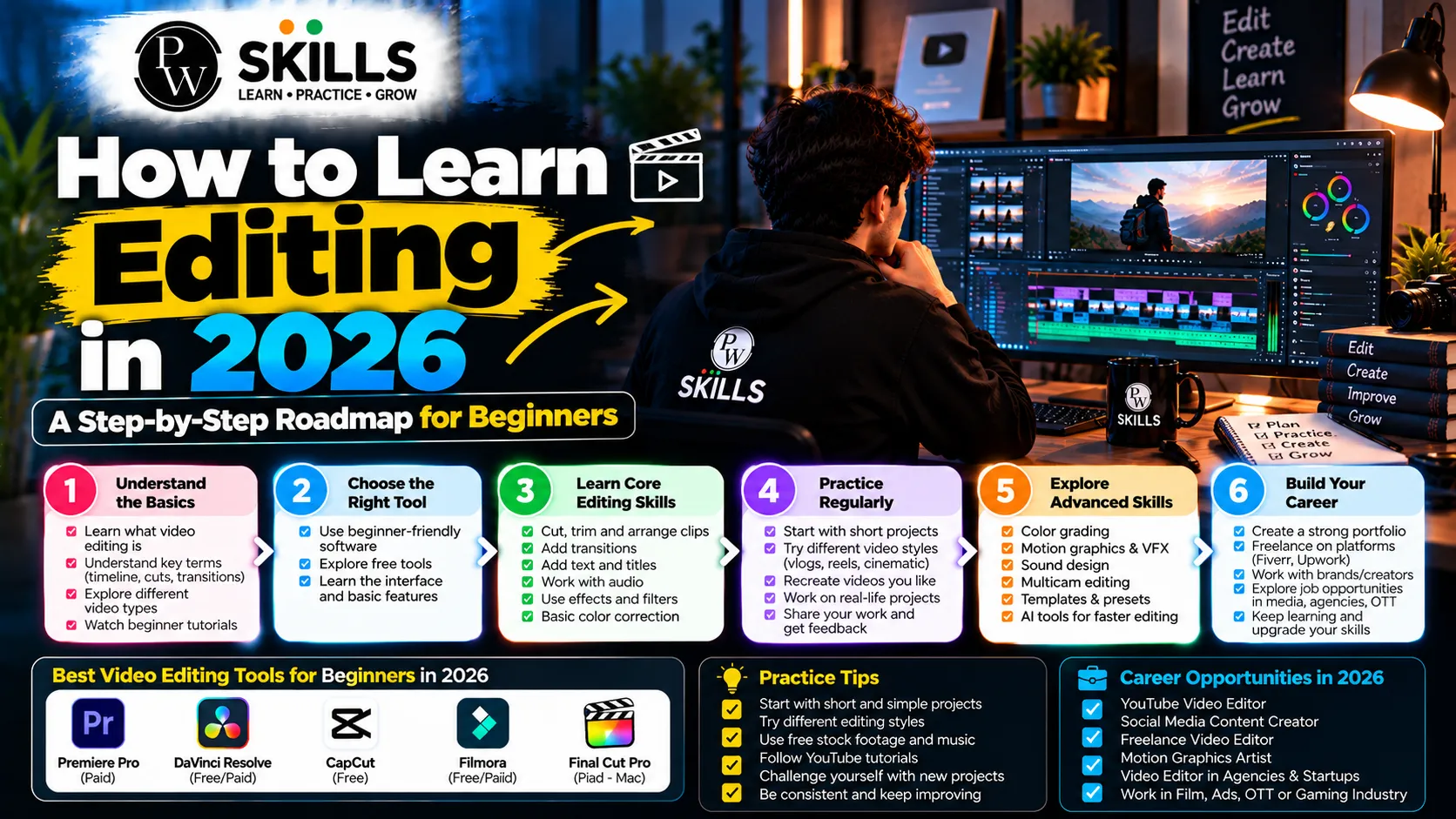
Modern digital platforms need skilled video editors who can create short-form content, cinematic videos, and engaging visual stories. For beginners, knowing how to learn editing can make the process more structured and less overwhelming. This guide covers essential editing concepts, practical learning steps, and useful skills to help beginners build confidence and develop relevant video editing abilities.
What Are the Basics of How to Learn Editing?
To learn the basics you need to work on file organization, timetable management and easy cuts. New editors sometimes jump in and try and dive straight into complicated effects before they understand how the different clips work together. Import and catalog the raw footage in a methodical way to maintain an efficient workflow. Learning how to edit clips on a timeline is the basis of every professional project.
The technical process inside the technical process is the cutting of dead space, the matching of audio tracks and the sequencing of visual frames in a logical manner. Students should be importing footage and making clean cuts on a daily basis. Designated media asset bins help protect against project corruption and save hours in post production. Learning these basic steps opens the door for further advancement to more complex creative methods.
Newcomers should also spend some time learning the reason behind each editing decision. The cut should trim any extraneous footage, improve pacing and move the story ahead. Short clips can be useful in understanding how timing impacts the viewer's experience. Choose simple projects like as a 1-minute social media video, an easy talking-head video, or a short montage. These projects include enough material to practice editing, sequencing, audio placement, and basic transitions without being too overwhelming.
It's always a good idea to examine your adjustments before moving on to a new technique. Play the video straight through, with no edits, then review and note areas where the pacing seems slow, the audio isn’t clear, or the cuts feel odd. They do this over and over and get a better idea of what they did wrong and learn to make better editing judgments.
Also Explore our Course : AI Video Creator Course Online
How to Learn Editing Software Through Regular Practice
Choosing a professional standard application like Adobe Premiere Pro builds professional workflows. Professional software gives powerful features for color correction, audio synchronization and multi-tracking timeline control. Video editing practice bridges the gap between theory and practice. Working directly in a timeline improves muscle memory for keyboard shortcuts and navigating across panels.
Regular drills should include matching cuts to audio beats and using basic cross-dissolve transitions. Editors need to experiment with pace, B-roll and text overlays to hold viewers’ attention. Practicing the daily timeline as a habit speeds up software proficiency tremendously. Repeated use of software panels makes frightening toolbars become sensible creative extensions.
Beginners shouldn’t try to learn all features at once when learning editing software. Begin with the tools you'll find in nearly any project. Selection tool, razor tool, timeline controls, audio controls, text options, export settings. Once you're comfortable with those, move on to keyframes, masking, color correction, motion graphics and other sophisticated capabilities. This is a step-by-step process that makes software easier to learn.
Practice can also become more effective when each session has a specific goal. For example, one session can focus only on clean cuts, while another can focus on audio syncing or B-roll placement. Repeating the same task across different projects helps develop speed and accuracy. Beginners can also recreate the editing style of simple videos they enjoy as a practice exercise, while using their own footage and assets.
|
Editing Phase |
Core Focus Area |
Recommended Practice |
|
Phase 1 |
File Management & Basic Cuts |
Import raw clips and arrange clean sequences. |
|
Phase 2 |
Audio & Visual Enhancement |
Sync audio tracks and apply simple B-roll. |
|
Phase 3 |
Motion Graphics & Effects |
Add keyframes, text layers, and dynamic masks. |
How to Learn Editing Step by Step With a Structured Roadmap
A defined video editing roadmap for video editing ensures consistent advancement from absolute novice to experienced professional. Learners should learn about visual storytelling principles first, before moving on to complicated motion graphics. It’s knowing the difference between key A-roll video, and supporting B-roll clips that determines how a scene breathes. Each cut has to have a clear narrative reason for being there, not some dazzling visual distraction.
The next step is to include AI technologies that can automate transcription and hook generation. Today, editors rely on AI-assisted workflows that transcribe conversation and generate accurate captions at speed. Milestone projects structure the learning route to make sure you have actual proof of skill progress. Completed projects are reviewed against industry benchmarks to identify areas of technical refinement.
A practical roadmap can be divided into stages so that learners know what to study next. During the first stage, focus on importing footage, organising files, making cuts, and arranging clips. The second stage can introduce audio editing, B-roll, transitions, titles, and basic colour correction. Once these skills are comfortable, move towards motion graphics, keyframes, masking, and more detailed sound design.
The final stages should focus on completing real projects and building a portfolio. Instead of only watching tutorials, learners should create videos that apply several skills together. For example, a short promotional video can include footage selection, clean cuts, background music, captions, colour adjustments, and a suitable export format. Completing projects at each stage makes progress easier to measure and reveals which skills need more practice.
Learners should also revisit older projects after gaining new skills. Comparing an early edit with a later project can show improvements in pacing, audio, visual consistency, and storytelling. This review process makes the learning journey more practical and helps turn individual techniques into a complete editing workflow.
Which Skills Should You Build as You Learn Editing?
Elevating your expertise requires diving into motion graphics, visual effects, and precise colour grading. Video editing skills extend far beyond basic cutting to include animation, keyframing, and custom masking. Clean audio mixing and balanced colour correction separate amateur projects from professional deliverables. Viewers judge video quality heavily by how crisp the sound design feels.
Dynamic text animations and subtitle sync procedures are the key to keeping retention high on short-form platforms. Editors have to match the color of clips filmed in different settings so the visual continuity is maintained. Sound effects and background ambiance provide depth to otherwise flat visual sequences. Fine-tuning these secondary abilities turns simple video clips into intriguing digital storytelling.
How to Build a Portfolio While You Learn Editing
Showcasing completed projects helps beginners attract freelance clients and creative collaborators. When you learn editing, building a dedicated portfolio is just as important as understanding the software. Compile three to five diverse samples ranging from cinematic travel reels to fast-paced storytelling shorts. Real-world projects prove capability much better than theoretical certificates.
Publishing unfinished or raw practice edits on social media invites constructive feedback from experienced peers. Documenting your creative journey builds visibility and connects you with industry networks. Freelance guidance resources help beginners pitch their services and price their early projects correctly. A strong portfolio acts as a digital passport into the competitive media industry.

FAQs
What is the best way to start how to learn editing?
Do I need expensive hardware for video editing practice?
How does a structured video editing roadmap help beginners?
Can anyone learn editing for beginners without prior experience?
Which core video editing skills matter most for employment?






Get Free Counselling Today
and Clear up all your Doubts
 Live & recorded classes available at easeDashboard for progress trackingLakhs of practice questions

