

DevOps and Cloud Computing Course Roadmap: A Month-by-Month Study Plan for Working Professionals
 Hardik Gupta24 Aug, 2026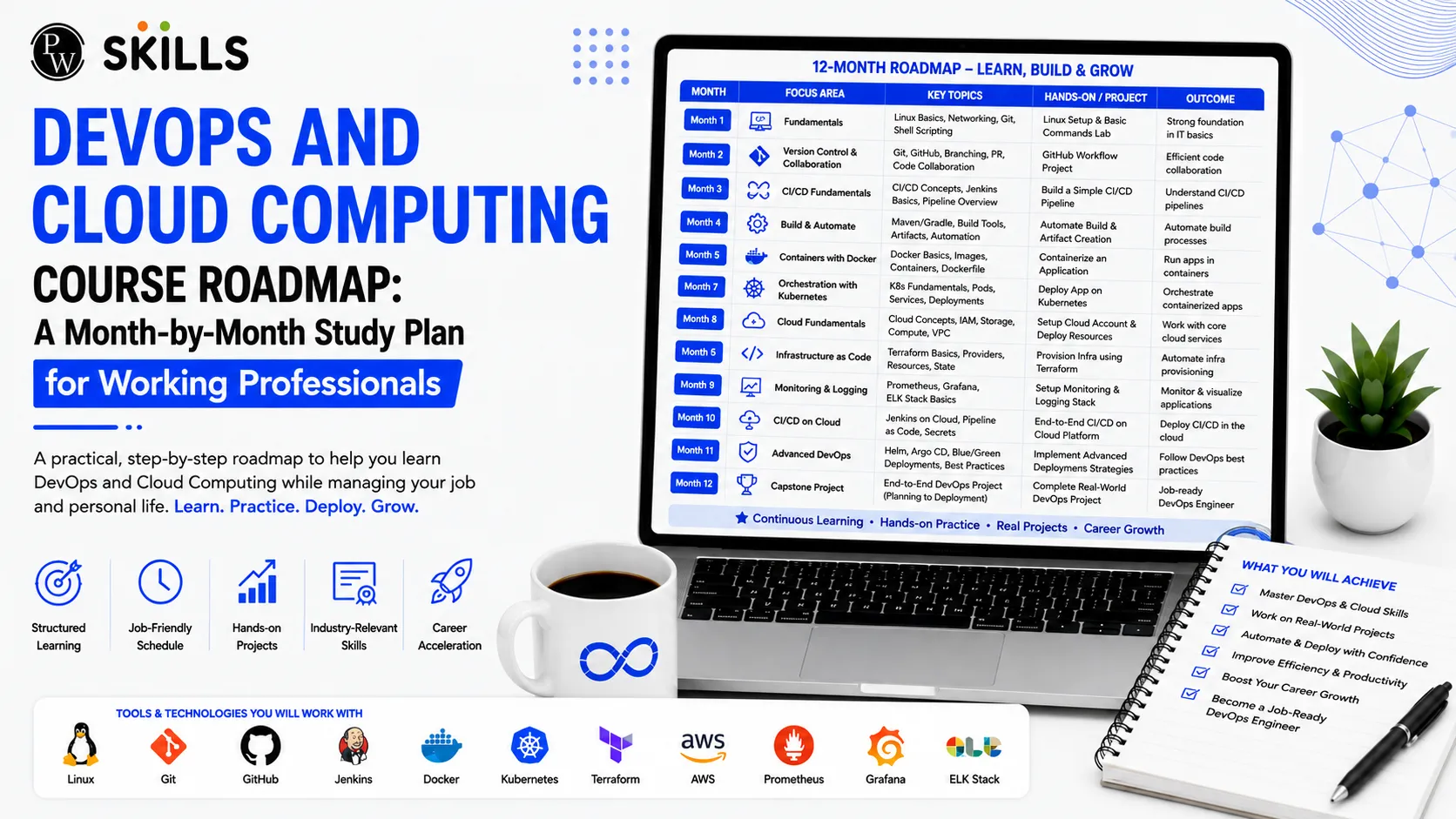
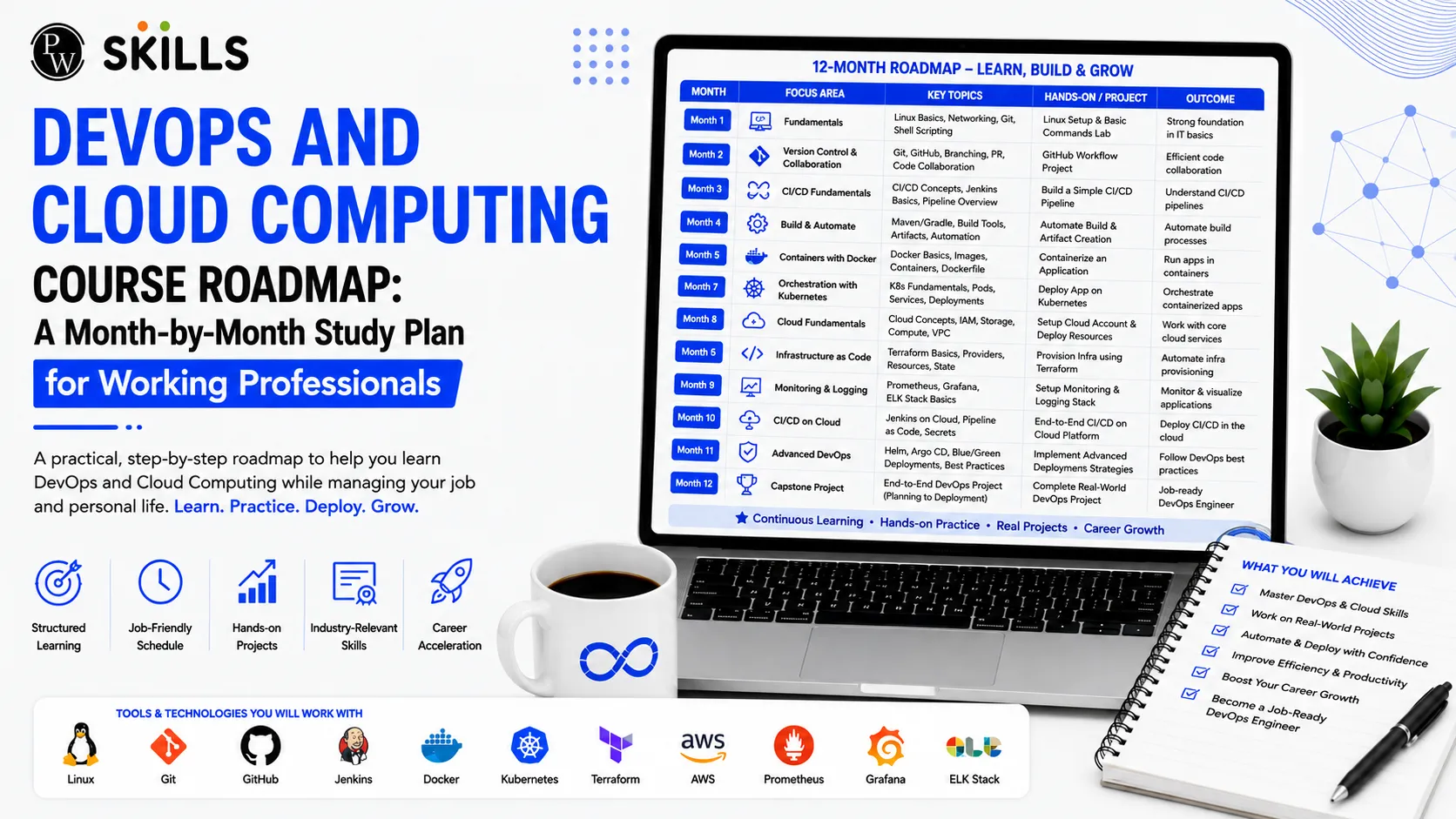
Working professionals often struggle to transition into cloud engineering while managing demanding job schedules. Self-study frequently lacks clear direction, resulting in gaps regarding enterprise deployment processes. A structured DevOps and Cloud Computing Course offers a clear roadmap that breaks down complex infrastructure topics into actionable monthly milestones. By studying 8 to 10 hours per week, you can master Linux administration, version control, continuous integration, infrastructure automation, and cloud management without quitting your current job.
What is a DevOps and Cloud Computing Course?
A Cloud Computing and DevOps Course is an intensive training program designed to bridge the gap between software development and IT operations. It focuses on combining development and operations, automating infrastructure tasks, using cloud platforms like AWS to scale applications, and applying monitoring and logging for continuous feedback.
Tech professionals can benefit from these skills as companies increasingly use automated pipelines to release software faster and improve system reliability. Knowledge of infrastructure automation and cloud deployment can also help professionals prepare for specialized roles such as Site Reliability Engineer jobs while reducing communication gaps between development and operations teams.
6 Month DevOps and Cloud Computing Course Roadmap
A 6 Month Cloud Computing and DevOps Course Roadmap gives learners a clear path to build cloud and DevOps skills step by step. It covers Linux, AWS, Docker, Kubernetes, CI/CD pipelines, and infrastructure automation through practical learning.
Month 1: Mastering Linux Fundamentals, Python, and System Monitoring
The first phase of your Course establishes your core technical foundation. Because enterprise cloud environments run predominantly on Linux distributions, mastering command-line interfaces and resource monitoring is essential.
Topics for Month 1
-
Linux Operating System Architecture: Understand kernel operations, process execution, memory management, threads, and file system hierarchies.
-
Network Administration: Master network monitoring, Linux firewall rules, and traffic analysis using fundamental Linux tools.
-
Resource Monitoring: Identify system performance bottlenecks by monitoring CPU loads, memory utilization, and network performance.
-
Python Scripting: Build foundational Python scripts to automate routine administrative tasks and system maintenance.
|
Study Focus |
Essential Commands & Concepts |
Primary Operational Goal |
|
System Health |
top, htop, vmstat, uptime |
Diagnose CPU and memory bottlenecks |
|
Network Tools |
netstat, iptables, tcpdump |
Manage firewall rules and analyze traffic |
|
Automation |
Python OS modules, Bash scripts |
Eliminate repetitive system tasks |
Month 2: Version Control Systems and Continuous Integration Pipelines
In the second month of your Cloud Computing and DevOps Course, the focus shifts to managing source code and automating software builds. Continuous Integration (CI) ensures that code modifications are integrated and verified automatically.
Key Learning Milestones for Month 2
-
Source Code Management: Implement Git workflows, branching strategies, pull request reviews, and repository management via GitHub.
-
Continuous Integration Build Servers: Set up Jenkins servers to automate code compilation, run automated test suites, and report build status.
-
Scripting for Pipelines: Write automated scripts to manage multi-step application builds upon every developer commit.
-
SDLC Integration: Align version control practices with modern Software Development Life Cycle (SDLC) models.
Month 3: Containerization and Orchestration with Docker and Kubernetes
Software applications must run predictably across various development, staging, and production environments. Month three of your Course addresses this challenge using containerization and orchestration platforms.
Core Technologies and Practices
-
Docker Containerization: Package software code along with its dependencies into lightweight, isolated containers.
-
Container Images & Storage: Write efficient Dockerfiles, manage image layers, and maintain secure image registries.
-
Kubernetes Orchestration: Deploy multi-container applications across cluster environments to achieve high availability.
-
Auto-Scaling and Deployment: Implement automatic scaling, self-healing pods, load balancing, and zero-downtime rolling updates.
Month 4: Infrastructure Automation and Configuration Management
Manual server configuration leads to configuration drift and deployment failures. Month four of the Course focuses on infrastructure as code (IaC) and configuration management tools.
Key Skills for Infrastructure Automation
-
Declarative Infrastructure: Use Terraform to define cloud resources declaratively, allowing version-controlled infrastructure updates.
-
Configuration Management: Use Ansible to automate software installation, patch management, and server provisioning across hundreds of virtual machines.
-
Environment Standardization: Ensure that development, testing, and production environments maintain identical configurations.
-
State File Management: Manage Terraform state files securely to prevent concurrent modification issues during deployment.
Month 5: AWS Cloud Architecture, Security, and Serverless Technologies
Cloud computing provides the flexible infrastructure needed to host automated deployment pipelines. In month five of Course, you will explore AWS cloud services and cloud security.
Core AWS Modules
-
Identity & Access Management (IAM): Configure precise access control policies, roles, and multi-factor authentication to secure cloud resources.
-
Compute & Storage Services: Deploy virtual servers using EC2 instances and manage scalable cloud storage via AWS S3 buckets.
-
Networking & Load Balancing: Set up Virtual Private Clouds (VPC), configure subnets, and balance incoming web traffic with Application Load Balancers.
-
Serverless Architectures: Build cost-effective, scalable serverless workloads using AWS Lambda and container services.
Month 6: Capstone Projects, Systems Monitoring, and Site Reliability Engineer Jobs
The final month of your Course synthesizes all technical concepts into production-grade projects while preparing you for advanced technical interviews.
Integrated Learning and Career Preparation
-
Production Monitoring: Set up centralized log aggregation and performance tracking tools to monitor live applications.
-
Capstone Deployment: Architect an end-to-end continuous integration and delivery pipeline that deploys a multi-tier web application to AWS using Kubernetes and Terraform.
-
Targeting Site Reliability Engineer Jobs: Prepare for technical interviews by reviewing system design principles, reliability metrics (SLOs/SLIs), incident response procedures, and automated disaster recovery.
-
Resume & Profile Optimization: Highlight real-world project portfolios and showcase industry certifications co-branded with NSDC to demonstrate candidate readiness.
Benefits of DevOps and Cloud Computing Course
This Course helps learners build practical cloud and automation skills that are widely used in today's IT industry. From managing cloud infrastructure to automating software deployment, the course prepares students and working professionals for real-world DevOps and cloud engineering roles.
-
Builds Job-Ready Skills: Learn practical skills in Linux, AWS, Docker, Kubernetes, Git, Terraform, and CI/CD.
-
Improves Cloud Knowledge: Understand how to create, manage, monitor, and secure cloud infrastructure.
-
Teaches Automation: Learn how to automate repetitive tasks using tools such as Terraform, Ansible, and scripting.
-
Provides Hands-On Experience: Work on real-world projects and deployment tasks to understand how DevOps works in practical environments.
-
Improves Deployment Skills: Learn how to build and manage CI/CD pipelines for faster and smoother software delivery.
-
Supports Career Growth: Prepare for roles such as DevOps Engineer, Cloud Engineer, Cloud Support Associate, and Site Reliability Engineer.
-
Strengthens Troubleshooting Skills: Learn how to monitor systems, read logs, identify errors, and respond to cloud infrastructure issues.
-
Helps Build a Strong Resume: Practical projects and knowledge of widely used DevOps tools can add value to your technical profile.
-
Supports Career Switching: The structured learning path can help IT professionals and beginners move toward cloud and DevOps careers.
-
Prepares for Modern IT Work: Learn skills that are widely used for cloud deployment, infrastructure management, automation, and software delivery.



FAQs
1. Can a DevOps and Cloud Computing Course prepare me for Site Reliability Engineer Jobs?
2. What/Why is a DevOps and Cloud Computing Course useful for working professionals?
3. How does infrastructure automation help in DevOps?
4. How long does it take to complete a DevOps and Cloud Computing Course?
5. Can I learn DevOps while working full-time?





Get Free Counselling Today
and Clear up all your Doubts
 Live & recorded classes available at easeDashboard for progress trackingLakhs of practice questions

