

What Is HTML Basics? Hypertext Markup Language Basics Explained
 Varun Saharawat30 Oct, 2025
HTML, or HyperText Markup Language, is the main language used to create or structure web pages. It combines two things: Hypertext, which links different web pages together, and Markup, which organizes the content using tags. These tags help in the structuring of the web pages so that computers can read and display the content correctly. HTML is easy to understand because it uses simple tags that tell the browser how to place content.
In this article, we have broken down some HTML basic concepts in a beginner-friendly manner, explaining what HTML is, how HTML works, and how to get started with your very first HTML document. Continue reading this article and by the end, you will have a solid understanding of this foundational web technology.
HTML Introduction
HTML, which stands for HyperText Markup Language, is a markup language primarily used for structuring and formatting content of the web page. It serves as the foundational language for creating web pages and web applications. Key points about HTML include:- HTML allows users to manipulate text, images, and other content to display them in the desired format.
- HTML provides the code structure for a web page. It dictates how content should be organized and displayed on browsers.
- Combined with other web technologies like CSS and JavaScript, HTML plays a crucial role in building websites. It structures the content, while CSS styles it, and JavaScript adds interactivity.
Key Features Of HTML
HTML, or HyperText Markup Language is primarily used for creating and structuring web pages on the internet. Here are some of the primary key features of HTML are written below for your better understanding:1) Web Page Structure
HTML defines the basic structure and layout of a web page, It helps in organizing the content into elements such as headings, paragraphs, lists, links, images, forms, tables, and more. It provides a hierarchical structure that browsers use to understand and display content to users.2) Content Presentation
HTML allows web developers to present content in an organized manner, making it easier for users to read, navigate, and understand information on web pages. By using semantic elements and tags, HTML enhances readability and user experience.3) Cross-Browser Compatibility
HTML ensures cross-browser compatibility by providing a standardized markup language that browsers interpret consistently across different platforms and devices. This ensures that web pages display and function correctly across various browsers like Chrome, Firefox, Safari, Edge, and others.4) Accessibility
HTML, or Hypertext markup language supports accessibility features, allowing developers to create web pages that are accessible to individuals with disabilities. By using alt text for images, descriptive links, proper headings, and several HTML attributes, HTML helps in making the web content more inclusive and usable for all users.5) Integration with Other Technologies
HTML combines easily with other technologies like CSS (Cascading Style Sheets) for styling and layout, JavaScript for interactivity and dynamic functionalities, and various server-side frameworks for data processing, content management, and application development.6) Responsive and Mobile-Friendly Design
HTML supports responsive design principles, allowing developers to create web pages that adapt and respond to different screen sizes and devices. By using media queries, flexible layouts, and scalable images, HTML helps in creating mobile-friendly and responsive web designs that provide consistent user experiences across desktops, laptops, tablets, and smartphones.7) Hyperlinks and Navigation
HTML helps the developer in the creation of hyperlinks by using <a> tags that connect web pages, resources, and content within a website or across different websites. This helps the user to navigate across different websites easily.HTML Tags
HTML tags are used to define elements within an HTML document, providing structure and content to web pages. We have listed below, some commonly used HTML tags with examples for your better understanding of the concept:1) Document Structure Tags
These tags in HTML are used to help developers in organizing and structuring the overall layout of a web page. They are basically of three types- <html>, <head>, and <body>. Let us see what each one of them is used for. a) <html>: It is the root element of an HTML document without which the code written will not work. It is a container tag that contains both- the opening as well as the closing tag. The basic format of this tag is:| HTML Tag Format |
| <!DOCTYPE html> <html lang="en"> ... </html> |
| Head tag in HTML |
| <head> <title>Page Title</title> <meta charset="UTF-8"> </head> |
| Body Tag In HTML |
| <body> <h1>Welcome to My Website</h1> <p>This is a paragraph of text.</p> </body> |
2) Text Formatting Tags
These tags can change the way text looks on a web page. For example, `<b>` makes text bold, `<i>` makes it italic, and `<u>` underlines it. They help in increasing the readability of the text by making it more visually appealing. Some of the important tags used in this category are written below for your reference:- a) <h1> to <h6>: These tags are used for defining the headings of different levels in content. Here, <h1> is the most important one and <h6> is the least.
- b) <p>: This tag is used for defining the starting and ending of a paragraph.
- c) <strong>: It is quite similar to the <b> tag and is used for making the text bold by adding some extra emphasis to it.
- d) <em>: It is similar to the <i> tag and is used to make the text italic by adding some extra importance to it.
3) Links and Navigation Tags
These HTML tags are used for creating clickable links to other pages or websites. The `<a>` tag is used to make a hyperlink, allowing users to jump from one page to another or visit different sites. It helps users to navigate through content and connect with other resources in a hasslefree manner. The basic syntax and use of this tag is written below for your reference: <a>: It defines a hyperlink to navigate to another page or resource.| Anchor Tag Syntax |
| <a href="https://www.pwskills.com">Visit Our Website </a> |
- <a> Tag: This is called an anchor tag, and it is used to create a hyperlink. A hyperlink is something which you can click on to go to another page or website.
- href="https://www.pwskills.com": The href attribute stands for "hyperlink reference." It tells the browser where the link should take you when clicked. In this case, it takes you to the website "https://www.pwskills.com".
- Visit Our Website: This is the text that will appear as the clickable link. When someone clicks on this text, they will be taken to the link mentioned in the `href`.
- </a> Tag: This is the closing tag for the anchor tag. It tells the browser that the hyperlink ends here.
4) Lists Tags
These tags are used by the full stack developers to organize information into lists. Lists generally help users to present information in a clear and structured way. In today’s time we generally have two types of lists namely- Ordered list and unordered list. Let us understand each one of them clearly. a) <ul> and <li>: It is used to define an unordered list and its items. This unordered list is mainly represented with bulleted points and not with the numbers. The basic format of this list is given below for your reference:| HTML Unordered List Example |
| <ul> <li>Orange</li> <li>Mango</li> <li>Grapes</li> <li>Chiku</li> </ul> |
Output-
|
| HTML Ordered List Syntax |
| <ol> <li>Orange</li> <li>Mango</li> <li>Grapes</li> <li>Chiku</li> </ol> |
Output-
|
5) Images and Media Tags
These HTML tags are used for adding images and other media to a web page. The `<img>` tag is used to insert images, and the `<video>` and `<audio>` tags are used for video and sound files. They make pages more engaging and visually appealing by including different types of media. The commonly used tags and their syntax is given below for your better understanding. a) <img>: It is used to embed an image into the web page. The basic syntax used for this tag include-| <Img> tag in HTML |
| <img src="Cat.jpg" alt="This is a picture of a cat"> |
- <img> Tag: This tag is used to display images on a web page. It does not have a closing tag, so it is written as a self-contained element.
- src: This stands for "source." It tells the browser where to find the image file. In the example, src="Cat.jpg" means the image file named "Cat.jpg" is located in the same folder as the web page.
- alt Attribute: This stands for "alternative text." It provides a description of the image for users who can’t see it, like those using screen readers or if the image fails to load. In this example, alt="This is a picture of a cat" describes what the image is about, helping users understand what is being shown.
| <audio> tag in HTML Basics |
| <audio controls> <source src="audio.mp3" type="audio/mpeg"> </audio> |
| <Video> tag in HTML Basics |
| <video controls width="320" height="240"> <source src="video.mp4" type="video/mp4"> </video> |
Pros and Cons of HTML
HTML (HyperText Markup Language) is the standard markup language used to create web pages. Here are some pros and cons of HTML:Pros of HTML
- Universal Standard: HTML is widely accepted for creating web pages across different browsers and platforms.
- Easy to Learn: It is simple to understand, making it accessible for both beginners and professionals.
- Structured Content: HTML uses semantic elements to organize content, which helps in improving content accessibility and SEO ranking.
- Integration: Works well with CSS and JavaScript for better styling, interactivity, and functionality.
- Scalable: Suitable for both simple static sites and complex web applications.
- Open Standards: It is maintained by the W3C platform which promotes collaboration on an ongoing improvement.
- Generative AI Course
- Python DSA Course
- Devops Course
- UI UX Course
- Digital Marketing Course
- Product Management Course
Cons of HTML
- Limited Features: HTML focuses on the structure of content and lacks advanced features for interactivity, styling, and dynamic functions.
- Verbosity: HTML can become lengthy and complex in larger projects, which can result in increasing file sizes and loading times.
- External Dependencies: For styling and interactivity, developers rely on CSS and JavaScript, which can introduce compatibility issues.
- Security Concerns: HTML alone lacks robust security features, which makes pages vulnerable to threats like injection attacks. So, proper security practices are necessary.
About HTML Examples
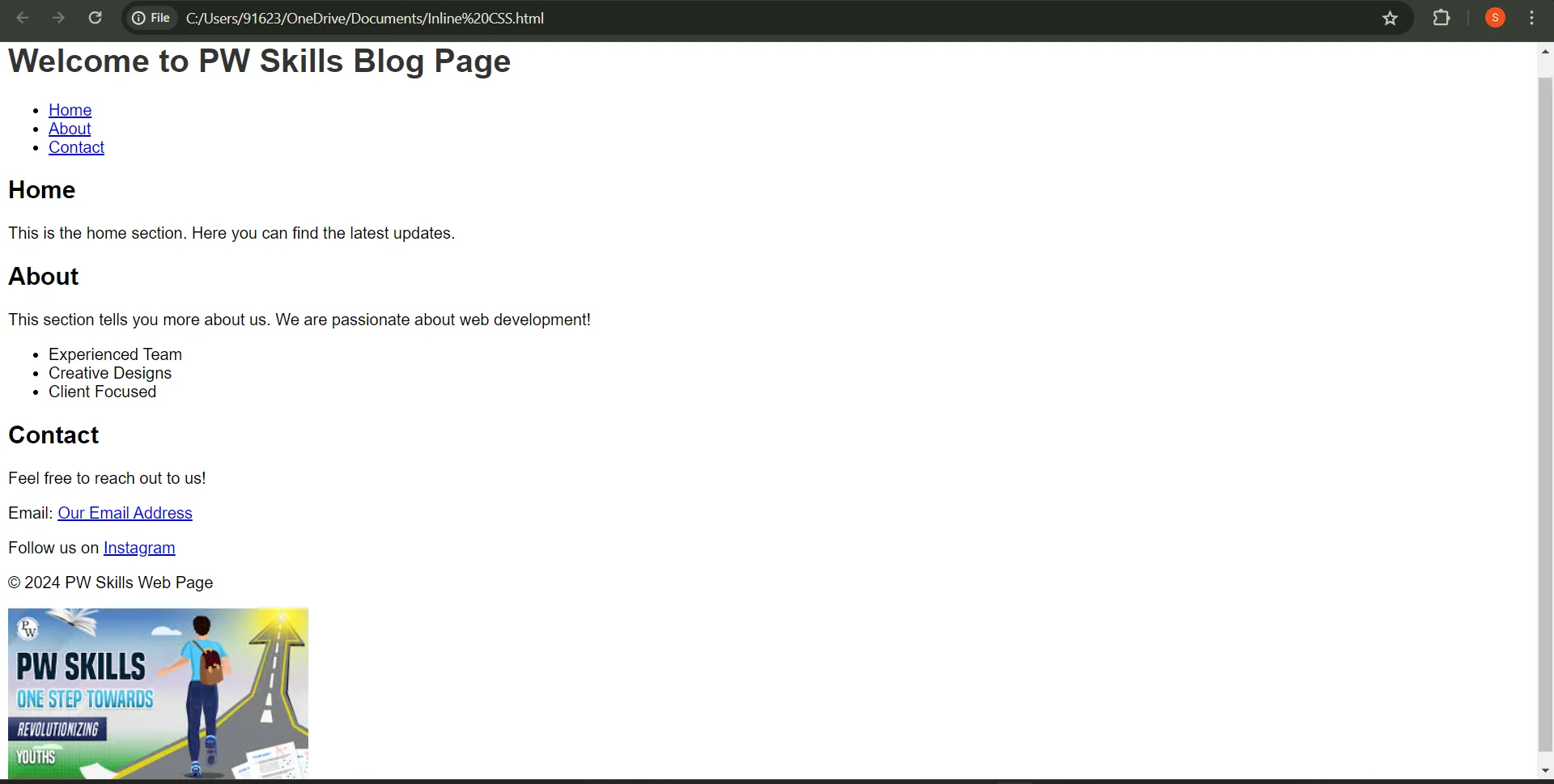
Now that we have understood the basic features of HTML along with all the HTML tags and their uses. Let us see how we can use all of these tags together to create a visually appealing and attractive web page. So, the basic HTML example demonstrating the usage of all the tags that we have read is shown below for your reference:| HTML Examples |
| <!DOCTYPE html> <html> <head> <title>PW Skills Web Page Example</title> <meta charset="UTF-8"> <style> body { font-family: Arial, sans-serif; } h1 { color: #333; } </style> </head> <body> <header> <h1>Welcome to PW Skills Blog Page</h1> <nav> <ul> <li><a href="#home">Home</a></li> <li><a href="#about">About</a></li> <li><a href="#contact">Contact</a></li> </ul> </nav> </header> <section id="home"> <h2>Home</h2> <p>This is the home section. Here you can find the latest updates.</p> </section> <section id="about"> <h2>About</h2> <p>This section tells you more about us. We are passionate about web development!</p> <ul> <li>Experienced Team</li> <li>Creative Designs</li> <li>Client Focused</li> </ul> </section> <section id="contact"> <h2>Contact</h2> <p>Feel free to reach out to us!</p> <p>Email: <a href="mailto:pwskills@gmail.com">Our Email Address</a></p> <p>Follow us on <a href="https://pwskills/instagram.com">Instagram</a></p> </section> <footer> <p>© 2024 PW Skills Web Page</p> <img src="pwskills.jpeg" alt="Banner Image"> </footer> </body> </html> |
Output-
 |
Difference Between HTML and HTML 5
Below table provides a concise overview of some key differences between HTML and HTML5. Keep in mind that HTML5 builds upon the foundation of HTML, introducing new features, elements, and APIs to enhance web development capabilities and user experiences.| Difference Between HTML and HTML 5 | ||
| Feature/Aspect | HTML | HTML5 |
| Definition | HTML (HyperText Markup Language) is the standard markup language used for creating web pages. | HTML5 is the latest version of HTML and introduces new elements, attributes, and functionalities. |
| DOCTYPE Declaration | Required to specify the type/version of HTML being used (e.g., <!DOCTYPE HTML>). | Simplified and standardized DOCTYPE declaration (<!DOCTYPE html>). |
| New Semantic Elements | Limited set of semantic tags (e.g., <div>, <span>, <header>, <footer>, etc.). | Introduces new semantic elements like <header>, <footer>, <nav>, <article>, <section>, <aside>, <main>, <figure>, and <figcaption>, which provide better structure and meaning to web content. |
| Audio and Video Support | Limited multimedia support requiring plugins (e.g., Flash). | Built-in support for <audio> and <video> elements, allowing native playback of audio and video content without plugins. |
| Canvas Element | Not available in previous versions. | Introduces the <canvas> element for drawing graphics, animations, charts, and more using JavaScript. |
| Form Enhancements | Basic form controls and validation. | Enhanced form controls (e.g., date, email, number, range, etc.) and built-in form validation features. |
| Local Storage | Limited storage options, primarily cookies. | Introduces Web Storage API (localStorage and sessionStorage) for storing key-value pairs locally in the browser, providing more efficient and larger storage options than cookies. |
| Geolocation API | Not available in previous versions. | Introduces Geolocation API for accessing user's geographical location, enabling location-based services and functionalities. |
| Web Workers | No support for multi-threading in browsers. | Introduces Web Workers API for running scripts in the background, allowing for multi-threading and improved performance. |
| Compatibility | Older browsers may have limited support or require workarounds for newer features. | Designed with backward compatibility in mind, but some features may require polyfills or fallbacks for older browsers. |
| Mobile Support | Limited mobile optimization and responsiveness. | Enhanced support for mobile devices, responsive design, and touch-based interactions, making it more mobile-friendly. |
| API Integration | Basic JavaScript functionalities. | Integrates with various JavaScript APIs, providing richer and more interactive web experiences. |
How are HTML, CSS, and Javascript Related?
HTML (HyperText Markup Language), CSS (Cascading Style Sheets), and JavaScript are three foundational technologies used to create web content and applications. They each have distinct roles but work together to produce interactive and visually appealing web experiences. Here's how they are related:1) HTML (Structure)
- HTML provides the structure and content of a web page. It uses markup tags to define elements such as headings, paragraphs, lists, links, images, and more.
- HTML lays the foundation for what content appears on a web page, such as text, images, forms, tables, and other elements.
2) CSS (Presentation)
- CSS is used for styling and presentation. While HTML defines the structure and content, CSS controls how the content looks. This includes aspects like layout, colors, fonts, spacing, and responsive design.
- By using CSS, developers can control the appearance of multiple web pages or an entire website with consistent styles. It separates the content from its presentation, allowing for greater flexibility and maintainability.
3) JavaScript (Behavior)
- JavaScript is a scripting language that enables interactivity and dynamic functionality on web pages. While HTML provides structure and CSS provides styling, JavaScript adds behavior to web pages.
- With JavaScript, developers can create interactive features such as animations, user interface elements, form validations, dynamic content updates, event handling, and more.
- JavaScript allows web pages to respond to user actions, make requests to servers (AJAX), manipulate the DOM (Document Object Model), and perform various client-side operations.
Relationship
- HTML, CSS, and JavaScript often work together to create a cohesive and functional web experience.
- A typical web page might consist of HTML for structure and content, CSS for styling and layout, and JavaScript for interactivity and dynamic behavior.
- For example, HTML defines the layout and content elements, CSS styles those elements to achieve a specific design, and JavaScript adds functionality like interactive buttons, form validation, or dynamic content loading.
Learn Web Development With PW Skills
Still confused about How to start and where to start from? Don’t worry we got your back here. Explore the exciting world of full stack development with our comprehensive PW skills Full stack development course! Starting from the basics of HTML to becoming an advanced Web designer gaining all the essential knowledge of HTML, CSS, JavaScript ,and much more. This course will provide you with a simplified road map to start your journey with experienced faculty staff, providing regular doubt sessions and Daily practice sheets for polishing your skills regularly. Whether you're into Web designing or just curious about how websites work, this course is for you. Get ready to unlock the secrets of HTML and start building your own awesome websites only with PW SkillsFor Latest Tech Related Information, Join Our Official Free Telegram Group : PW Skills Telegram Group




About HTML FAQs
When was HTML 4.01 released?
What is HTML?
What are the 5 uses of HTML?
What are the main features of HTML?
What is the importance of HTML?





Get Free Counselling Today
and Clear up all your Doubts
 Live & recorded classes available at easeDashboard for progress trackingLakhs of practice questions

