
Python String: Complete Guide For Beginners
A Python string is a sequence of characters enclosed in quotes. It supports indexing, slicing, and various built-in functions for text manipulation. Learn more now!
 Varun Saharawat30 Oct, 2025
Python string is used to enclose a sequence of characters inside double or single quotes. The indexing of a Python string starts with 0 and -1 marks the end. They are immutable data structures that contain various methods used in Python.
In this article, we are going to learn more about Python String and its uses in programming, web development, and other Python projects.
What is Python String?
Python String is a serial sequence of characters enclosed within a double inverted colon or quotes. For example, the “hello” string is made of a group of sequential characters ‘h’, ‘e’, ‘l’, ‘l’, and ‘o’. Python strings can be created using single quotes and double quotes.| #Create Python String using Double Quotes str1= “Physics Wallah” #Create Python String using Single Quotes str2= “Physics Wallah” |
Features of Python Strings
Let us highlight some of the major features of the string given below.- Immutable: Strings cannot be modified after they are created. Any operation on a string creates a new string.
- Unicode Support: Strings in Python 3 are Unicode by default, allowing them to represent characters from various languages and symbols.
- Indexed and Sliced: Strings support indexing (both positive and negative) and slicing for extracting specific characters or substrings.
- Concatenation and Repetition: Strings can be concatenated using the + operator and repeated using the * operator.
- Built-in Methods: Python provides a rich set of string methods for transformations, searches, and validations, such as lower(), find(), and replace().
- Multiline Support: Triple quotes (''' or """) allow for creating multiline strings.
- Iterable: Strings are iterable, meaning you can loop through each character using a for loop.
- Whitespace Handling: Methods like strip(), lstrip(), and rstrip() make it easy to handle leading and trailing whitespaces.
- Dynamic Typing: Strings in Python are dynamically typed, meaning you don’t need to specify their type explicitly.
- F-string Support: Introduced in Python 3.6, f-strings provide a concise and readable way to format strings.
- Case Sensitivity: Strings are case-sensitive, so "Python" and "Python" are considered different.
- Encoding and Decoding: Strings can be encoded to bytes and decoded back to strings using methods like encode() and decode().
- Membership Testing: The in keyword can be used to check the presence of a substring within a string.
- Default Iteration: By default, iterating over a string iterates through its characters one by one.
How Does Python String Differ From Arrays?
Strings in Python are used to enclose a sequence of characters inside while arrays can store multiple data types including numbers, strings, or objects. Strings are immutable and Arrays are mutable hence their characters inside can be modified. Strings only contain characters and hence when we are dealing with characters we use strings. An array can contain elements such as integers, floats, strings, or objects inside. Both array and string support indexing and slicing with a vast range of methods to perform various operations. Arrays are used for the collection of data while strings are mostly used for manipulation and representation.Python String Methods
Check some of the most used Python String methods are mentioned below.| Method | Description |
| str.lower() | Converts all characters to lowercase. |
| str.upper() | Converts all characters to uppercase. |
| str.capitalize() | Capitalizes the first character of the string. |
| str.title() | Converts the first character of each word to uppercase. |
| str.strip() | Removes leading and trailing whitespace (or specified characters). |
| str.lstrip() | Removes leading whitespace (or specified characters). |
| str.rstrip() | Removes trailing whitespace (or specified characters). |
| str.split() | Splits the string into a list based on a delimiter (default: space). |
| str.join(iterable) | Joins elements of an iterable with the string as the separator. |
| str.replace(old, new) | Replaces all occurrences of old with new. |
| str.find(sub) | Returns the lowest index of sub in the string; returns -1 if not found. |
| str.index(sub) | Like find(), but raises a ValueError if sub is not found. |
| str.startswith(prefix) | Returns True if the string starts with the specified prefix. |
| str.endswith(suffix) | Returns True if the string ends with the specified suffix. |
| str.isdigit() | Returns True if the string contains only digits. |
| str.isalpha() | Returns True if the string contains only alphabetic characters. |
| str.isalnum() | Returns True if the string contains only alphanumeric characters (letters and numbers). |
| str.isspace() | Returns True if the string contains only whitespace characters. |
| str.swapcase() | Converts uppercase characters to lowercase and vice versa. |
| str.zfill(width) | Pads the string on the left with zeros to make it the specified width. |
How To Assign Python String to a Variable?
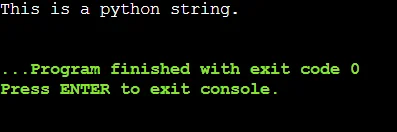
You can simply assign a Python string to a variable using an assignment operator. Let us assign a value to the variable and print the output on the screen.| a = “This is a Python String.” print (a) |
How to Print Multiline Python String?
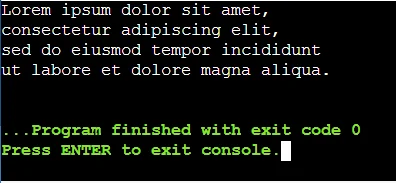
Python multiline strings are enclosed within three double quotes. The line breaks are inserted automatically in the same place as mentioned in the code. Let us understand multiline strings with examples.| a = “““ Lorem ipsum dolor sit amet, consectetur adipiscing elit, sed do eiusmod tempor incididunt ut labore et dolore magna aliqua. ””” print (a) |
Python String And Arrays
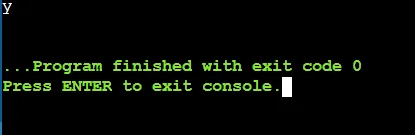
This is a simple theory that comes to mind whenever we are working with Python String. You can access the elements inside the python string using a simple square bracket and index. A single character in Python is generally a string having a unit length. Python string also starts from the zero index. Let us take an example to understand the concept.| a = “Physics Wallah” print (a[2]) |
Convert Python String to Lowercase or Uppercase
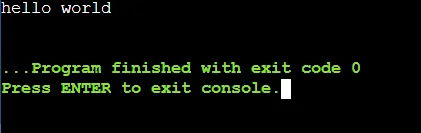
You can directly convert a Python String to lowercase or uppercase using the Strings Method. To convert Python string to lowercase, you can convert using str.lower() and str.upper() to uppercase using this simple Python String method.| text = "Hello WORLD" print(text.lower()) # Output: 'hello world' |
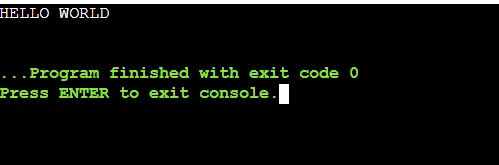
| text = "Hello world" print(text.upper()) # Output: 'HELLO WORLD' |
Capitalize the First Word Of the Python String using str.capitalize()
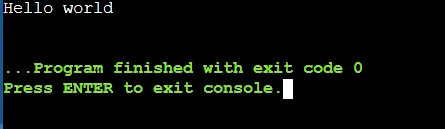
You can simply capitalize the first word of your Python string using Python string method i,e. str.capitalize(). Suppose we want to capitalize the first word of the string i,e. “hello world”, then it will convert to “Hello world”. Let us understand this Python string method using a simple example below.| text = "hello world" print(text.capitalize()) # Output: 'Hello world' |
Convert the First Character of Each Word Into a Capital Letter
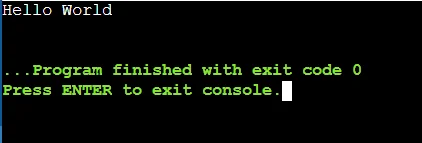
We can simply convert the first word of a Python string into a capital letter easily with the title() method.| text = "hello world" print(text.title()) # Output: 'Hello World' |
Remove Leading and Trailing Whitespace using Python String Method
You can simply remove any extra whitespace using the strip() method in Python. To remove any leading whitespace use lstrip() and to remove trailing whitespace use rstrip(). To remove all leading and trailing whitespace you can use strip() Python string method.| text = " hello world " print(text.strip()) # Output: 'hello world' text = " hello world" print(text.lstrip()) # Output: 'hello world' text = "hello world " print(text.rstrip()) # Output: 'hello world' |
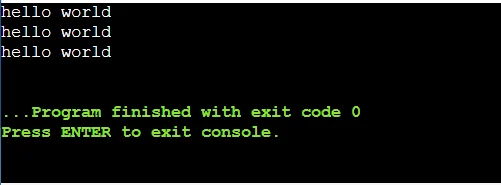
Join Elements with String using join() Method
You can easily join elements of an iterable with the string as the separator. Suppose you want to print an output of “Hello, World, Python” with separated commas and join together.| words = ['Hello', 'World', 'Python'] print(", ".join(words)) # Output: 'hello, world, python' |
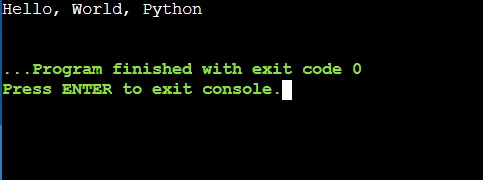
Replace Old with New Python String Method
You can easily replace all occurrences of an old string using the replace(old, new) method. Suppose you want to replace all occurrences of “world” with “Python”, then use this String method. Check a simple example below.| text = "hello world" print(text.replace("world", "Python")) # Output: 'hello Python' |
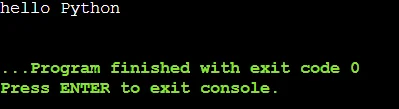
How to use the Python String Method to Find String
You can easily find a string by using the find() method in Python where it will return the lowest index of the string and will return -1 if not found within the string.| text = "hello world" print(text.find("world")) # Output: 6 print(text.find("Python")) # Output: -1 |
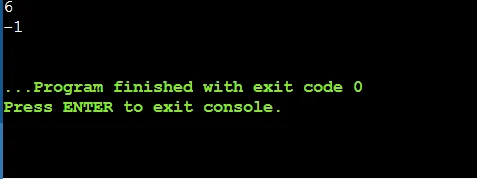
Find Prefix and Suffixes using Python String Method
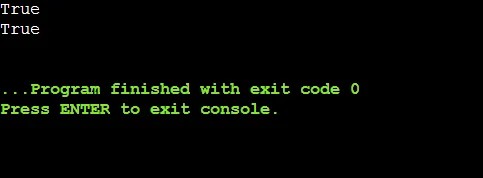
You can find the starting suffix and prefix of a Python string using the .startwith() and endswith() method. Let us understand both String methods by using a simple example.| text = "hello world" print(text.startswith("hello")) # Output: True text = "hello world" print(text.endswith("world")) # Output: True |
Learn Python Language with PW Skills
Get a complete understanding of Python programming language and Data Structures like Python Arrays, Strings, Graphs, trees, etc with Decode DSA with Python Course on PW Skills. Learn in the presence of dedicated mentors through interactive coursework and in-depth tutorials, practice exercises, module assignments, and projects available in the course. Become a proficient programmer, web developer, data scientist, or machine learning expert with this self-paced course only on pwskills.com



🔥 Trending Blogs
Python String FAQs
Q1. Are Python Strings mutable or immutable?
Ans: Python strings are immutable, meaning anything written inside a string cannot be changed after they are once created. Any operation that modifies a string actually creates a new string.
Q2. What is the difference between single, double and triple quotes in Python Strings?
Ans:
Single (') and double (") quotes are functionally identical for creating single-line strings.
Triple quotes (''' or """) are used for multi-line strings or docstrings.
Q3. How to Concatenate Strings in Python?
Ans: You can use a + operator or join () method to concatenate two strings in Python.
Q4. How do I check if a string contain a specific substring?
Ans: You can use Python string methods such as .find() or .index() to check whether the substring is inside the string or not. You can also use in keyword to check whether a string contain a specific substring.


Talk to a counsellorHave doubts? Our support team will be happy to assist you!



Get Free Counselling Today
and Clear up all your Doubts
Talk to Our Counsellor just by filling out the form.
Join 15 Million students on the app today!
 Live & recorded classes available at easeDashboard for progress trackingLakhs of practice questions

