

Pull Request: Complete Guide (2025 Edition) – Examples, Workflow, and Code Review
 Varun Saharawat30 Oct, 2025
Nowadays, cooperation is a matter of survival in software development, and it is no longer viewed as a luxury. Enter the pull request. This process is more than a technical step in Git; it is the bridge between developers, testers, and reviewers. Students putting their first project on GitHub and professionals running a DevOps pipeline must understand pull requests; otherwise, all is lost.
This guide intends to cover everything: What is a pull request? Pull request examples, how pull requests fit into the development process, and why pull requests are important for code review. Let's dive deep.
What Is a Pull Request (PR)?
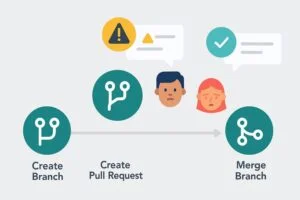
A pull request is a request to merge changes from one branch into another branch in the Git repository. Think of it as returning your essay draft to your professor. You would say: "Here is my version. Please review it, suggest any edits, and approve it before it becomes final." And instead of sneaking your changes directly into the "main" file, you create a pull request. There, your teammates will comment, test, and make improvements before it gets merged.Pull Request Example in GitHub
Here is a simple pull request from your GitHub experience:- Create a new branch: feature-search-student.
- Add a new search bar in your student management system project.
- Push this branch to GitHub.
- Open a pull request titled: "Add search functionality for students".
- Teammates review, find bugs, recommend changes.
- You fix errors, update PR.
- After approval, it is merged back to the trunk/main branch.
How PRs Fit into the Development Process
A PR is more than just the process of merging code. It's referred to as a gate in the software lifecycle. The standard workflow usually involves:- Branching: The developer creates a branch for a new feature/bug fix.
- Coding and Testing: The changes are made and tested locally.
- Push and Pull Request: The developer pushes the branch and opens a PR.
- The Code Review: The peers comment, test, and approve or request changes.
- Merge: They get merged into main once approved.
Why Are Pull Requests Important for Code Review?
Bugs slip through if there are no reviews. PR ensure a guided structure for these reviews.Quality Control:
Only code that has been reviewed is allowed into production.Team Learning:
Junior developers get feedback, and senior developers share knowledge.Transparency:
The documented discussions show why certain decisions were made.Security:
Provides a check against malicious or inadvertently harmful code. Code review is not about nitpicking—it is a collaborative team effort.Benefits of Pull Requests for Students and Professionals
Students: Expose them to a professional environment and teach them to take feedback gracefully. Professionals: Maintaining a solid standard of a code in large projects, limiting production bugs, and creating collaboration. From a 3-person student group to a 500-person open-source community, the PR keeps everyone aligned.Pull Request vs Direct Commit vs Merge Request
| Feature | Pull Request | Direct Commit | Merge Request (GitLab) |
| Code Review | Yes | No | Yes |
| Collaboration | High | Low | High |
| Transparency | Clear history & comments | Limited context | Clear history & comments |
| Use Case | Teams & open source | Solo projects | Teams & enterprises |
Best Practices for Effective Pull Requests
- Have a clear title: “Fixes login bug in student portal” > “Updating code.”
- Make small and focused PRs: Easier to review and merge.
- Include screenshots or results of tests for UI changes.
- Be professional in replying to feedback- PRs are conversations, not battlegrounds.
- Before creating a PR, make sure your branch is up to date with main.
Common Beginner Mistakes
| Mistake | Why It’s a Problem | How to Fix It |
| Vague PR titles (e.g., “Update code”) | Reviewers don’t understand the purpose of the changes | Write clear titles: “Fix login bug in student portal” |
| No description or context | Reviewers waste time guessing what the code does | Add a summary: problem, solution, tests done |
| Mixing unrelated changes | Harder to review, may introduce hidden bugs | Keep PRs small and focused on one task |
| Skipping local tests | Broken code may get pushed, blocking the team | Always run tests before creating a PR |
| Ignoring reviewer feedback | Slows down merging and reduces trust in teamwork | Acknowledge comments, make changes, re-request review |
| Opening massive PRs | Overwhelms reviewers, delays review cycle | Break into smaller, manageable pull requests |
| Not syncing with main branch | Leads to merge conflicts later | Regularly pull updates from main before opening PR |
How Pull Requests Work in Open Source Collaboration
- In open source, maintainers do not allow changes to be made directly to main. Contributors fork, alter, and submit PRs.
- This mechanism keeps the project secure while opening the gates for contributions from thousands across the world.
- Renowned projects such as React, Kubernetes, and Linux all run on PR workflows.
Advanced Topic: Automated Pull Request Reviews in 2025
Currently, by using a whole range of tools, e.g., GitHub Actions, SonarQube, or AI-driven bots, it is possible to:- Check the code style.
- Run automated tests.
- Flag vulnerabilities.
 Join Our Devops & Cloud Computing Telegram Channel
 Join Our Devops & Cloud Computing WhatsApp Channel
Step by Step: How to Create a PR in GitHub (2025 Edition)
- Clone the repository locally.
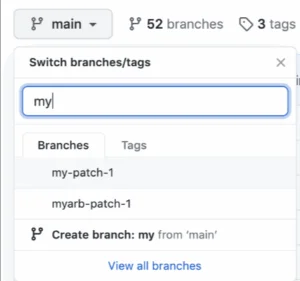
- Create a feature branch: git checkout -b feature-dark-mode.
- Make changes, commit & push branch.
- On GitHub, click on New Pull Request.
- Select branches (main vs. feature).
- Write the title & description.
- Submit PR.
- Chime in on the discussions, fix feedback & update.
- Once approved, click on Merge.
The Future of PR in DevOps
In the future, PR shall grow even wiser:- AI Review Assistants: Sniff out code smells before humans.
- Automated Security Tests: Call out vulnerabilities instantaneously.
- Instant Documentation: Auto-generate changelogs off the PR.
Why PR Are the Backbone of Open-Source Collaboration
If you've ever contributed to an open-source project on GitHub, you know that a PR is the actual entrance to contribution. Maintainers don't give access directly to the main branch; contributors fork the project, make changes, and submit PR instead. This way, projects can remain open to global contributions, while still protecting them from low-quality or harmful code. In a nutshell, PRs overwhelm and counteract coding; anyone from anywhere can suggest improvements.
Pull Requests versus Direct Commits
Students often ask: why not commit directly instead of creating a PR? The answer lies in control and review. Direct commit: Good for personal projects but risky in team settings. Pull request: Safe for collaboration, as it ensures peer reviewing, documentation, and quality checks. Then, the process goes PR regard for challenger, regards for reviewer, and that's actually why we organize big-scale collaboration without it turning chaotic.Future of Pull Requests in DevOps
As automation improves, even PR is changing. The AI-assisted tools are now helping with the PR review by detecting vulnerabilities, suggesting fixes, or autofilling test cases. However, the human element-team discussions, design debates, and peer learning-will never be replaced. The future may find faster, smarter, and more automated reviews, but it is the PR that will stay the check for all collaboration.Also Read:
- What is Version control System? Working, Types, And Benefits
- The 20 Most Important DevOps Trends in 2025: Beat the Game
- What is DataOps? Complete Explanation For Beginners
- File Permission in Linux- 7 Powerful Facts for Beginners and Pros Alike
Learn with PW Skills DevOps Course
Want to go beyond just learning and actually master Git, CI/CD pipelines and real-world DevOps workflows? PW Skills DevOps Course gives you hands-on training, projects and mentorship designed for both students and working professionals. Don't just read about DevOps-practice it with experts and get job ready.



🔥 Trending Blogs
FAQs
How do I write a good Pull Request description?
Be very specific. Cite the problem, the solution, and the testing done. Example: "Fixed login timeout issue by optimizing session handling."
Can a Pull Request be edited after creation?
Yes. You can push more commits to the same branch and the PR will update automatically.
Are Pull Requests only for big teams?
No. Even individual developers benefit; PRs help keep track of history and encourage discipline.
What happens if multiple Pull Requests conflict?
You will need to resolve merge conflicts by adjusting the code manually before merging.


Talk to a counsellorHave doubts? Our support team will be happy to assist you!



Get Free Counselling Today
and Clear up all your Doubts
Talk to Our Counsellor just by filling out the form.
Join 15 Million students on the app today!
 Live & recorded classes available at easeDashboard for progress trackingLakhs of practice questions

