TensorFlow is an open-source Python library developed by Google. TensorFlow operations help manage complex tasks in machine learning and deep learning models. Tensor can easily be scaled on different platforms with its easy integration features, which are utilized in neural networks.
Tensor, in mathematical terms, is an array of objects consisting of n-dimensional arrays. Here, let us learn more about TensorFlow operations and how to implement them during the execution of advanced AI models.
Constants and Variables In TensorFlow
You must be familiar with the types of variables and constants TensorFlow uses. The method of initializing and defining these elements is are little different from what we used to follow in other programming languages.
You have to mark constant and variable functions in the TensorFlow package to declare them.
| import tensorflow as tf
dummy_constant= tf.constant(12)
print(sample_constant.dtype)
A1=tf.Variable([1,2,3,4])
print(A1)
print(A1.numpy())
B1=A1.numpy()
B1=tf.Variable(B1)
print(B1) |
We need to import constants and variables separately in TensorFlow. We can store them inside a variable and use them for operations. The statement given below shows how to import a constant.
| dummy_constant = tf.constant(12) |
Read More: PY Library: 10 Python Libraries for Beginners (Learn Now)
TensorFlow Numerical Operations
TensorFlow offers a number of numerical operations, including mathematical computations useful for machine learning tasks. Tensor can easily be scaled to match multiple numerical operations, ranging ahead of matrix multiplications, element-wise operations and more.
Tensors are used to represent the data extracted using tensors. They are represented as tf.tensor objects. These are multi-dimensional arrays capable of holding vectors, numbers, matrices, and other higher-dimensional data structures.
The above syntax is used to define tensors, which can also perform various arithmetic operations.
- tf.add is used to add elements to tensors a and b.
- tf.subtract is used for subtraction, taking elements in its hand.
- tf. multiply is used to perform multiplication, taking elements into consideration
- tf. divide is used for division.
| import tensorflow as tf
a = tf.constant([10, 20, 30])
b = tf.constant([5, 4, 3]) # Define tensors
sum_result = tf.add(a, b) # Addition
diff_result = tf.subtract(a, b) # Subtraction
quot_result = tf.divide(a, b) # Division
prod_result = tf.multiply(a, b) # Multiplication
print("Sum of Tensors:", sum_result)
print("Difference of Tensors:", diff_result)
print("Quotient of Tensors:", quot_result)
print("Product of Tensors:", prod_result) |
Output
| Sum of Tensors: [15 24 33]
Difference of Tensors: [5 16 27]
Quotient of Tensors: [2. 5. 10. ]
Product of Tensors: [50 80 90] |
Different TensorFlow Operations
Let us now check different TensorFlow operations that we can perform on individual tensor elements.
1. Addition Operation
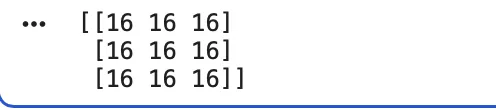
The addition operation in a tensor is a frequently used calculation that programmers might need while performing machine learning tasks. The addition operation in TensorFlow is generated element-wise. Check the following code.
| #create two sensor elements
a1 = tf.fill ([3,3], 11) #declare a 3x3 tensor with value 11
a2 = tf.fill ([3, 3], 5)
# Addition of tensors
a3 = tf.add(a1, a2)
print (a3.numpy()) |
Output
We first have to start with creating two or more tensors with their values assigned.
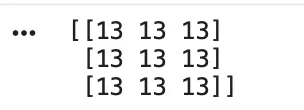
2. Subtraction Operation
The subtraction operation in TensorFlow is used to perform element-wise subtraction. It subtracts the value of one tensor from another at the same position.
| import tensorflow as tf
# Create two tensor elements
b1 = tf.fill([3, 3], 20) # 3x3 tensor filled with 20
b2 = tf.fill([3, 3], 7) # 3x3 tensor filled with 7
# Subtraction of tensors
b3 = tf.subtract(b1, b2)
print(b3.numpy()) |
Output
Read More: TensorFlow Intro: Introduction to TensorFlow For Beginners 2025
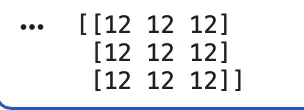
3. Multiplication Operation
The multiplication operation in TensorFlow is used for multiplying each position in the tensor by the corresponding position in the other.
| import tensorflow as tf
# Create tensors
c1 = tf.fill([3, 3], 4) # 3x3 tensor filled with 4
c2 = tf.fill([3, 3], 3) # 3x3 tensor filled with 3
# Multiplication
c3 = tf.multiply(c1, c2)
print(c3.numpy()) |
Output
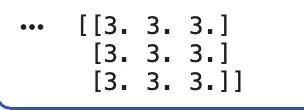
4. Division Operation
TensorFlow operations like division is used to divide element-wise and returns a floating output.
| import tensorflow as tf
# Create tensors
d1 = tf.fill([3, 3], 18)
d2 = tf.fill([3, 3], 6)
# Division of tensors
d3 = tf.divide(d1, d2)
print(d3.numpy()) |
Output
5. Power Operations
This TensorFlow operation is used to raise each element of the tensor to a specified power. You can use the .pow() element to raise each element to a power.
| import tensorflow as tf
# Create tensor
e1 = tf.fill([3, 3], 2)
# Raise each element to the power of 4
e2 = tf.pow(e1, 4)
print(e2.numpy()) |
Output
6. Modulus Operation
The modulus operation is used to return the remainder when dividing the tensor elements. The modulus operation can be called using the tf.math.mod() method.
| import tensorflow as tf
# Create tensors
f1 = tf.fill([3, 3], 17)
f2 = tf.fill([3, 3], 5)
# Modulus operation
f3 = tf.math.mod(f1, f2)
print(f3.numpy()) |
7. Tensor Square
This tensorflow operation is used to square a tensor using the tensor.square() method.
| import tensorflow as tf
tensorA = tf.constant([1, 2, 3, 4])
tensorSquare = tf.square(tensorA)
print(tensorSquare) |
Output
Here, you will get the output as [ 1, 4, 9, 16 ].
Read More: Brain.js: GPU Accelerated Neural Networks In JavaScript For Browsers, Complete Beginners Tutorial [2025]
8. Tensor Reshape
You can reshape a tensor using the tensor.reshape() method. The number of elements in a tensor is the product of the sizes in the given shape.
| const tensorA = tf.tensor([[5, 10], [15, 20]]);
const tensorB = tensorA.reshape([4, 1]); |
Here, the output of the following will be [ [5], [10], [15], [20] ]
Logical And and OR Operations With Tensor
The “tf.reduce_all” and “tf.reduce_any” are used to compute the logical OR and AND operations. You can use TensorFlow operations to compute any logical AND and OR operations easily.
| import tensorflow as tf
x = tf.constant([[True, False, True], [False, True, True]])
all_result = tf.reduce_all(x, axis=1)
any_result = tf.reduce_any(x, axis=0)
print(all_result)
print(any_result) |
Output
Statistics Operations With Tensors
TensorFlow can be used to perform statistical operations using the .reduce() method. Let us learn how we can calculate the mean using the TensorFlow “.reduce ()” method.
1. Mean (Sum of all numbers/Total numbers)
| import tensorflow as tf
x = tf.constant([[10, 20, 30], [40, 50, 60]])
mean_result = tf.reduce_mean(x, axis=0)
print(mean_result) |
Output
Read More: Top 60+ Data science Interview Questions and Answer
2. Max (Return the Largest Value)
We can use TensorFlow to calculate the largest element along an axis.
| import tensorflow as tf
x = tf.constant([[10, 20, 30],
[40, 50, 60]])
max_result = tf.reduce_max(x, axis=0)
print(max_result) |
Output
3. Min (Return the Smallest Value)
TensorFlow operations also consists of methods like calculating the smallest element along a given axis.
import tensorflow as tf
x = tf.constant([[10, 20, 30],
[40, 50, 60]])
min_result = tf.reduce_min(x, axis=0)
print(min_result)
|
Output
4. Standard Deviation
Standard deviation is one of the tensorflow operations for calculating the square root of variance. We can easily calculate the standard deviation as well as the variance using the methods in TensorFlow operations.
| import tensorflow as tf
x = tf.constant([[10., 20., 30.],
[40., 50., 60.]])
std_result = tf.math.reduce_std(x, axis=0)
print(std_result) |
Output


 Varun Saharawat19 Nov, 2025















 Live & recorded classes available at ease

