

Python Objects (With Examples): Complete Explanation For Beginners
If you are a beginner starting with Python objects and classes then learn all methods, and properties of Python programming language OOPs. In this blog, we will completely define Python Objects to help beginners start with Python objects and classes.
 Varun Saharawat30 Oct, 2025
Python objects are an important part of the Python programming language as being an object oriented programming language, Python relies on objects and classes to handle its data items. Python complete itself around the concept of OOPs which help manage codes in an efficient manner. Python objects and classes are the main concepts of Python OOPs.
In this tutorial, we will learn more about Python objects in detail and learn how we are going to use it in our projects. We will also take an example to understand the Python OOPs and its object.
What are Python Objects?
Python Objects are instances of a class. It is a collection of data and functions which is made to operate on data. Everything you create, whether it is a list, function, class, or other is an object. Talking about the Python objects it has its own types, identity, address, attributes, and methods. Let us take an example to understand Python objects.Python Objects: Key Takeaways
- Python Objects are an important entity in OOPs i,e. Object Oriented Programming.
- Objects are the instance of class which can be anything or everything in Python.
- Classes help us create objects such as string, list, tuples, and more.
- For example, in the class Car, we can have objects like, Honda, Ford, Hyundai, Toyato, BMW, etc.
What are the Uses of Python Objects?
Python objects have an important role to play in Python programming and solving complex problems.- With Python objects you can combine variables and methods into a single unit.
- You can easily use the Python object to implement reusability of an object and save yourself from writing the same code again and again.
- Objects make it easier to model real-world entities like a bank account, student, game character, etc.
- You can add, update, or delete properties/methods dynamically.
- Objects allow classes to inherit properties/methods from other classes.
How to Create an Object In Python?
We can create an object with some easy parameters in Python. Whenever we create an instance of the class it is stored as an object of the class. The object takes the reference from the name of the class. The object inherits every function, behavior and attributes mentioned in the class.- First we start with defining a class.
- Now, we have to call the class to create an object which is also known as instantiating.
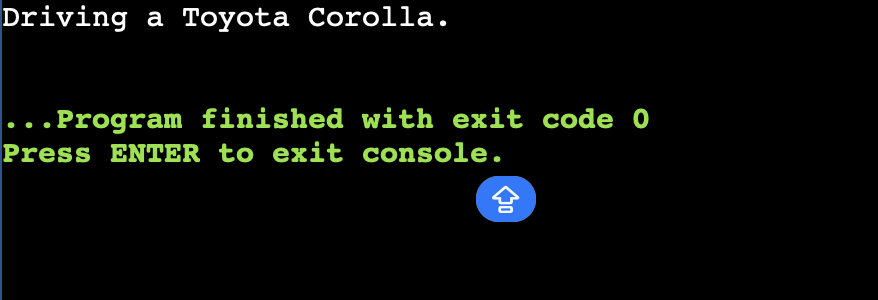
- Let us understand it completely using the example given below. We are taking a class Car which consists of objects.
| class Car: def __init__(self, brand, model): self.brand = brand self.model = model def drive(self): print(f"Driving a {self.brand} {self.model}.") my_car = Car("Toyota", "Corolla") my_car.drive() |
Output
 |
How to Access Object Variable and Functions In Python?
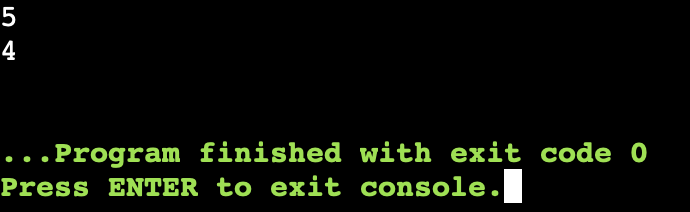
We will start with creating an object from a class which can be accessed easily using the syntax. Let us understand how we can easily access the object within a class.| class car: toyota = 5 maruti = 5 honda = 4 volkswagen = 3 #Now we will create a simple object and access the attributes inside the class. obj 1 = car() print (obj 1. maruti) print (obj 1. honda) |
Output
 |
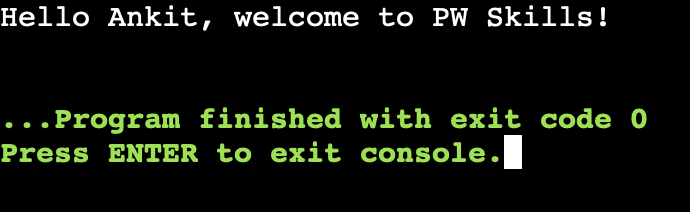
| class PWSkills:: def greet(self, name): print(f"Hello {name}, welcome to PW Skills!") # Creating an object of the class student = PWSkills() student.greet("Ankit") |
Output
 |
Changing Python Objects Properties Using Simple Methods
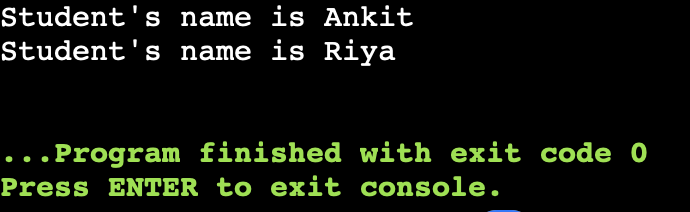
Let us now understand how we can easily change the Python values and variables in methods or variables. Let us understand it using a simple example.| class PWSkills: def __init__(self, student_name): self.name = student_name def update_name(self, new_name): self.name = new_name def display_name(self): print(f"Student's name is {self.name}") # Create an object student = PWSkills("Ankit") # Display the initial name student.display_name() # Change the name using method student.update_name("Riya") # Display the updated name student.display_name() |
Output
 |
Can I Create Multiple Objects In A Python Class
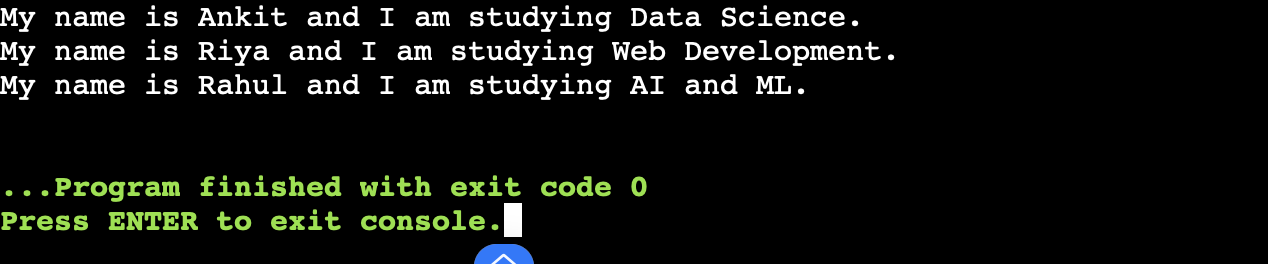
Yes, we can easily create multiple Python objects using a single class methods and attributes. You can integrate distinct methods and properties to the Python object. You have to just keep on creating different instances of objects in Python using unique variables.| class Student: def __init__(self, name, course): self.name = name self.course = course def introduce(self): print(f"My name is {self.name} and I am studying {self.course}.") # Create multiple objects student1 = Student("Ankit", "Data Science") student2 = Student("Riya", "Web Development") student3 = Student("Rahul", "AI and ML") # Calling methods for each object student1.introduce() student2.introduce() student3.introduce() |
Output
 |
Deleting Python Objects or Properties With Methods & Variables
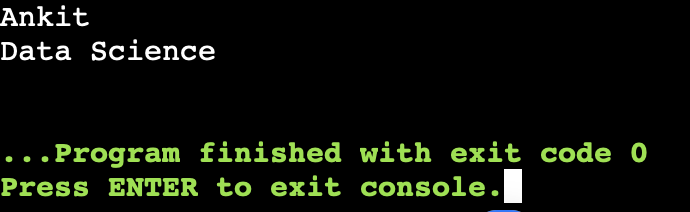
We can easily delete or change the properties of Python object methods or variables.| class PWSkills: def __init__(self, student_name): self.name = student_name self.course = "Data Science" # Create an object student = PWSkills("Ankit") # Display properties print(student.name) # Output: Ankit print(student.course) # Output: Data Science # Deleting a property del student.course # Trying to access deleted property will give an error # print(student.course) # Uncommenting this will cause AttributeError # Deleting the entire object del student # Trying to access deleted object will also cause an error # print(student) # Uncommenting this will cause NameError |
Output
 |
 |
Learn Data Science with PW Skills
Build a strong career in Data Science with PW Skills Data Science with Generative AI Course. This course is powered by Generative AI to help you learn in demand skills based on a latest curriculum. You will learn about advanced tools and work on real time projects during this course. Learn in the guidance of dedicated career mentors and build a strong portfolio for your data science career. If you are looking for a transition from data analyst to data scientist role then PW Skills is one of the best option you have to upskill yourself in the field of data science only at pwskills.com



🔥 Trending Blogs
Python Objects & OOPs FAQs
Q1. What are Python Objects?
Ans: Python Objects are instances of a class. It is a collection of data and functions which is made to operate on data. Everything you create, whether it is a list, function, class, or other is an object.
Q2. Can we modify Python objects?
Ans: Yes, we can easily create, delete, and change value within a Python object.
Q3. Can we delete a complete Python Object?
Ans: We can easily delete a Python object using the del() operator. It will remove all attributes related to an object in Python.
Q4. What is the difference between Python objects and classes?
Ans: Python objects are instance of class whereas the class is a complete blueprint or a complete theme of a structure which will define the methods and attributes of a data.


Talk to a counsellorHave doubts? Our support team will be happy to assist you!



Get Free Counselling Today
and Clear up all your Doubts
Talk to Our Counsellor just by filling out the form.
Join 15 Million students on the app today!
 Live & recorded classes available at easeDashboard for progress trackingLakhs of practice questions

