

How to Use Jupyter Notebook: A Powerful Beginner’s Tutorial (2025)
Jupyter Notebooks are interactive documents that let you write and run code, visualize data, and add text explanations in one place. They are widely used in data science, machine learning, and education for analysis, experimentation, and sharing results.
 Varun Saharawat30 Oct, 2025
Data scientists, researchers, and developers communicate with code and data, jupyter notebook has changed the way. Jupyter Notebook is an open-source web app that allows to create and share documents containing live code, equations, visualizations, and narrative text. If you're looking to explore and learn about data science, machine learning, or even just interactive programming, mastering jupyter notebook is a need to initiate first step.
What is Jupyter Notebook?
Jupyter Notebook is an interactive computational environment built on a client-server architecture. It allows you to experience one document-oriented view that captures three components:- Live Code: Executable blocks of code, most often Python.
- Narrative Text and Equations: Rich text elements (Markdown) and mathematical equations (LaTeX) to document your work.
- Visualizations and Outputs: The output of your work, as tables and static images, even interactive plots, displayed directly below the code that created them.

Is Jupyter Notebook a Python IDE?
No, it's not a classic Python IDE. A classic IDE (such as PyCharm or VS Code) is a fully featured software application built to write, compile, debug, and manage complex, large software projects. It is created for producing final, structured code. The use of Jupyter Notebook as an Interactive Computing Environment is for exploratory analysis, prototyping, and documentation. It enables step-by-step execution and iteration during analysis, leaving it appropriate for data science, where you constantly test hypotheses and inspect intermediate results.Can I Use Jupyter Notebook for Free?
Yes, it's free. The Jupyter Notebook is a basic component of the entire open-source Project Jupyter and, thus, is completely free for downloading. Besides, there are many cloud service providers that offer free hosted versions:- Local Installation: Installing it using Anaconda or pip on your system and it is free.
- Cloud Platforms: Platforms like Google Colab and MyBinder give free, zero-setup environments to run Jupyter Notebooks, usually providing free access to computing resources like GPUs (in the case of Colab) stage 1: very initial setup.
Installing Anaconda A Beginner's Starter Kit
The beginner generally finds them stucked in the most complicated installations and dependencies management to install Python and its libraries. This is fully solved by Anaconda. Anaconda is actually the installation which provides you with the following- Python Interpreter: The engine runs your code.
- Package Manager (Conda): A powerful tool that manages all your libraries and environments to ensure collision-free cohabitation between different projects.
- Essential Libraries: No need to install libraries one by one. Anaconda comes pre-loaded with the most critical packages for data science, putting it in a ready-to-go environment.
Installing Anaconda for Jupyter
- Download the Installer: Go to the official Anaconda website and download the graphical installer for the latest version of Python 3.x that matches your operating system (Windows, macOS, or Linux). Anaconda Website - LINK
- Follow Installation Prompts: Run the installer and mostly accept the default settings.
- Check PATH Variable (Windows/Linux): You will see an option that says "Add Anaconda to my PATH environment variable" during installation. This has become a real commonly given advice to avoid it with experienced users, but that will make it easy for a beginner to run commands from the command line.
- Open Anaconda Navigator (Optional): Once installed, you can now open the Anaconda Navigator application with which you can launch Jupyter Notebook in a single click.
Exploring the Environment
- Starting Jupyter Notebook
- Now, after installing Anaconda, you can proceed to open Jupyter Notebook in one of the following ways:
Command Line:
- Open up your Terminal (macOS/Linux) or Command Prompt/PowerShell (Windows).
- The desired folder to which you want to use Jupyter as its root directory has to be navigated using the cd command (for example, cd Documents/MyDataProjects).
- Type in the command jupyter notebook and hit Enter.
- Now a server will start in the terminal and automatically open up your default web browsers to the Jupyter Notebook dashboard (usually at http://localhost:8888).
Using Anaconda Navigator:
- Open Anaconda Navigator application.
- You can see the "Launch" button under the Jupyter Notebook icon: Hit it.
The Jupyter Notebook Dashboard
The interface that will open in your browser is called the dashboard. The dashboard lets you: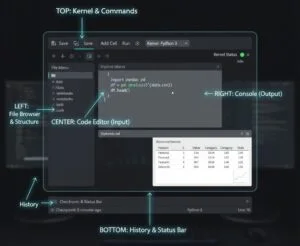
- Explore: Browse the files and folders existing within the directory where you launched the server.
- Create New Notebooks: Just hit the "New" button (top right) and select "Python 3" (or any other installed Kernel) to create a new notebook in a new browser tab.
- Manage Active Notebooks: The "Running" tab will show all the notebooks and terminals actively running and can be closed to free system resources.
What Is an .ipynb File?
An .ipynb file is the file format of a Jupyter Notebook. The extension stands for Interactive Python Notebook, in homage to its predecessor, IPython. This is not a straightforward text file. It is a JSON file that keeps everything from your session: the inputs of the code, the outputs of the cell, the documentation text, and the metadata of the kernel. Owing to the fact that it contains both code and output, the whole analysis becomes shareable and truly replicable.Working on Cells and Code
Jupyter Notebooks flow as a linear list of cells, and those cells can either contain code or narrative text. Cell Types: Code vs Markdown Code Cells (Default): This is where you write and execute programs in the language of your choice kernel (for example, Python). Running a cell (using Shift + Enter or clicking on the Run button) will immediately show the output right below the cell. The left label will change to In[ ] to In[1], it shows you were the first cell executed. Markdown Cells:- They allow you to add additional rich formatted text to explain the code and your analysis.
- They use Markdown, a very simple markup language to add formats for header (#), bold (**text**), lists (- item), and even mathematical equations in LaTeX.
- When you run a Markdown cell, it will provide the formatted text.
Essential Cell Operations and Keyboard Shortcuts in Excel
Being efficient in Excel is not just about knowing the formulas but knowing shortcuts and cell operations that save your time. If you are entering data, formatting, or navigating around sheets, these operations will smoothen your workflow and help with productivity. Here is a quick reference guide of commonly used cell operations and their keyboard shortcuts.| Cell Operation | Description | Windows Shortcut | Mac Shortcut |
| Copy Cell | Duplicates the selected cell’s content. | Ctrl + C | Command + C |
| Cut Cell | Removes the selected content to move elsewhere. | Ctrl + X | Command + X |
| Paste Cell | Inserts copied or cut content. | Ctrl + V | Command + V |
| Undo Action | Reverses the last action. | Ctrl + Z | Command + Z |
| Redo Action | Reapplies the undone action. | Ctrl + Y | Command + Y |
| Select All Cells | Highlights the entire worksheet. | Ctrl + A | Command + A |
| Insert New Row | Adds a new row above the selected one. | Ctrl + Shift + + | Command + Shift + K |
| Delete Row or Column | Removes the selected row or column. | Ctrl + – | Command + – |
| Find Data | Opens the find dialog box. | Ctrl + F | Command + F |
| Replace Data | Finds and replaces text or numbers. | Ctrl + H | Command + Shift + H |
| Bold Text | Makes selected text bold. | Ctrl + B | Command + B |
| Italic Text | Italicizes selected text. | Ctrl + I | Command + I |
| Underline Text | Underlines selected text. | Ctrl + U | Command + U |
| AutoSum | Automatically adds selected cells. | Alt + = | Command + Shift + T |
| Edit Active Cell | Enables editing inside a cell. | F2 | Control + U |
| Save Workbook | Saves the current Excel file. | Ctrl + S | Command + S |
| Open Workbook | Opens an existing Excel file. | Ctrl + O | Command + O |
| Create New Workbook | Starts a new Excel document. | Ctrl + N | Command + N |
| Close Workbook | Closes the current Excel sheet. | Ctrl + W | Command + W |
What is The Kernel?
The kernel is a computational engine used to run your code. A code cell sends its requests to the kernel, which is in charge of executing the code and sending the results to be displayed in the notebook.- State Persistence: A kernel maintains the state of the current session. Therefore all the variables, imported libraries, and defined functions from previously run cells are active and can be accessed by subsequent cells, even if they were run before those cells.
- Kernel Selection: A kernel (Python 3) is selected when you create a new notebook. However, additional kernels for R, Julia, and other languages can be set up too, making Jupyter truly a language-independent tool.
- Kernel Management: If your code is caught in an infinite loop, or it is memory-hungry, you can head to the Kernel menu and either interrupt or restart the kernel (which would clear all stored variables). Restart & Run All is a useful option to guarantee that the entire notebook sheath runs correctly from top to bottom.
What is Jupyter Notebook Used For?
The unique mixture of code, narrative, and live output makes Jupyter Notebook the favored tool for crucial steps in the data science pipeline: Data Analysis And Prototyping (How Used for Python And Pandas)- Exploratory Data Analysis (EDA): Jupyter provides libraries such as Pandas to load the data, view the head (df.head()), check the data types (df.info()), and most importantly, generate summary statistics at a rapid and iterative pace. You could load the data in one cell, clean it in another, and visualize it in yet the next cell with immediate feedback at each step.
- Data Wrangling: During data cleaning and transformation, you can isolate a small section of code inside a cell, execute it, see the transformed output immediately, and confirm the change with verification before proceeding to another transformation.
- Prototyping Machine Learning Models: Engineers often go through notebooks to experiment with different algorithms (e.g., using Scikit-learn), tune hyperparameters, and visualize model performance before refactoring the final logic into modular scripts.
Documentation, Collaboration, and Reporting
- Interactive Documentation: The Markdown cells allow you to tell the story of your data analysis, explaining why you chose certain methods or what the results of a visualization mean. The resulting notebook is a living document that is both executable code and a complete report.
- Shareable Workflows: The fact that the notebook file (.ipynb) contains both the input and output means you can share your entire workflow with a colleague, and they can see exactly what you did and the results you achieved without having to re-run the code, unless they want to verify or modify the steps.
- Presentation Mode: You can often export notebooks to formats like HTML or PDF, or even convert them directly into interactive slideshows.
Beyond the Notebook
Jupyter Terminal
From the Jupyter Dashboard, click on "New" and select "Terminal." This will launch an interactive command line with the terminal in your browser linked to the same environment as your notebooks. Using it is convenient to directly run shell commands or install Python packages via pip (pip install new_library) or file management commands like ls or mkdir.Saving and Exporting Your Work
Jupyter Notebook saves your work automatically every few minutes. However, it is best to save it manually via File > Save and Checkpoint or Ctrl/Cmd + S. Furthermore, you can easily export your completed notebook into different formats for sharing or publishing with: File > Download as...- Notebook (.ipynb): The native format for sharing with other Jupyter users.
- Python (.py): Only extracts the code cells, turning your notebook into a standard Python script.
- HTML (.html): Creates a static web page which is non-interactive and can be viewed in any browser.
- PDF (.pdf): Creates a non-interactive document for formal reporting (often requires additional tools like Pandoc/TeX).
Practices for Organizing Jupyter Notebooks: Insights from Reddit
Organizing and managing your notebooks is crucial for maintainability and collaboration. The data science community, particularly on Reddit, emphasizes key organizational tips:- Modularize and Reuse: Break down complex code into smaller, reusable functions stored in separate .py scripts.
- Structure Your Project: Organize files into clear sub-directories like notebooks/, data/, and tools/ for a standardized structure.
- Code in Python Scripts: Move reusable or final code out of the notebook and into Python scripts, using the notebook only for running the analysis.
- Use Extensions: Consider using extensions like the Table of Contents feature to help navigate long documents.
- Sharing Tools: Use platforms like GitHub Gists or Google Colab to easily share and collaborate on your notebooks online.
Your Journey Starts Now
Jupyter Notebook is more than just a coding tool; it's a powerful medium for thinking, experimenting, and communicating. Jupyter creates a transparent and reproducible environment that has become the gold standard in modern data science. Don't let the technical terms scare you; with the simple process of installing Anaconda and learning the Code/Markdown cells, you already have a skill that will become essential to your growth in Python, data analysis, and beyond.Kickstart Your Career in Data Science
Ready to master one of the hottest skills in the modern economy? Sign up for the PW Skills Data Science Course today. This comprehensive hands-on training is designed to give you practical training to become skilled. Transform your understanding of interactive data into a career.



🔥 Trending Blogs
FAQs
What is Jupyter Notebook?
It's an open-source web application that provides the platform for creating documents combining live code, narrative text, and visualizations.
Is Jupyter Notebook free of cost?
Yes, it is free, open-source software, and you can also use Google Colab.
Is Jupyter Notebook an IDE for Python?
No, it's an interactive computing environment suitable for prototyping and data analysis, rather than being a traditional IDE for software development on a large scale.
What is the file extension for Jupyter notebooks?
The file extension for Jupyter Notebook documents is .ipynb.
What is a Kernel in Jupyter Notebook?
The kernel is the engine that runs code within your notebook and keeps track of states (variables and imports) throughout the session.


Talk to a counsellorHave doubts? Our support team will be happy to assist you!



Get Free Counselling Today
and Clear up all your Doubts
Talk to Our Counsellor just by filling out the form.
Join 15 Million students on the app today!
 Live & recorded classes available at easeDashboard for progress trackingLakhs of practice questions

