

DBSCAN Clustering in ML - Density Based Clustering
 Nivedita Dar25 Apr, 2026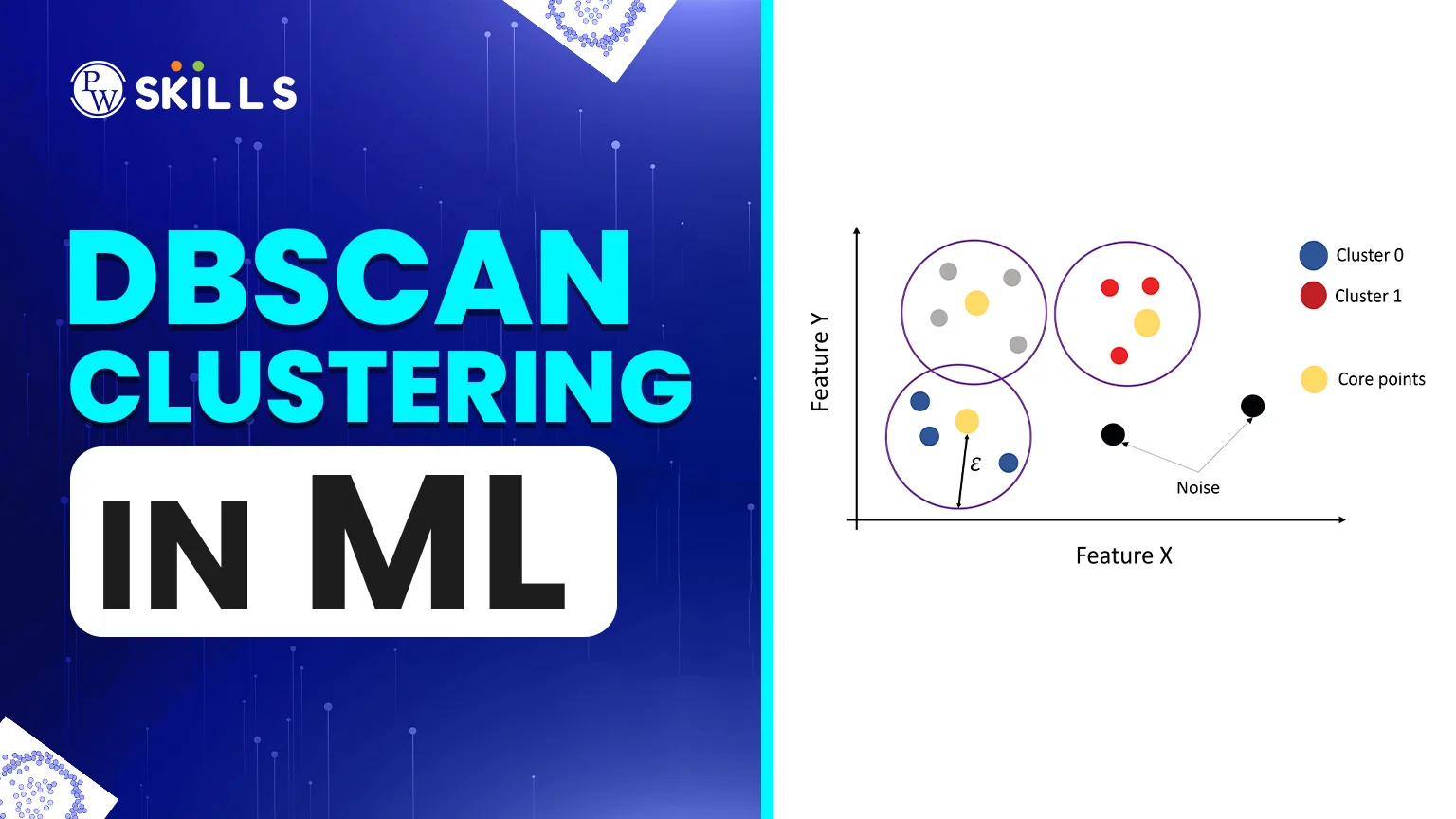
Most people who want to learn about machine learning start with K-Means. While K-Means is simple, it often fails when faced with datasets that aren't perfectly circular or contain random outliers. This is where DBSCAN clustering in ML becomes a game-changer. Density-Based Spatial Clustering of Applications with Noise (DBSCAN) solves this by examining how "crowded" a given area of data is.
In this article, we will break down the DBSCAN clustering in machine learning and see why it is a preferred choice for robust data mining.
DBSCAN Clustering in ML Parameters
To make the algorithm work, you need to tune two primary knobs. Choosing the right values for these determines whether your DBSCAN clustering Python implementation succeeds or fails. Let’s have a look at the DBSCAN clustering in machine learning parameters1. Epsilon (eps)
This is the maximum distance between two points for them to be considered neighbours. If you set eps too small, a large part of your data will be labelled as noise because points won't "reach" each other. If it is too large, all your clusters might merge into one giant blob.2. MinPts (Minimum Points)
This is the fewest points needed to make a dense area (a cluster). One good thumb rule is to set MinPts to at least the number of dimensions in your dataset plus one. For larger datasets with significant noise, a higher MinPts value is usually considered.How DBSCAN Clustering in ML Works?
The fundamental idea behind DBSCAN clustering is that a cluster is a high-density region separated by regions of lower density. DBSCAN looks for areas where the "population" of data points exceeds a threshold, while other algorithms look for a "center" point.Why Density is Important
In a typical DBSCAN clustering in machine learning working, density is the number of points within a given distance of each other. This enables the algorithm to follow the data's natural "shape." DBSCAN can accurately track data that resembles a crescent moon or a road that winds around. K-Means, on the other hand, would certainly divide it into two or three artificial circles.Steps of DBSCAN Clustering in ML Algorithm
How does the magic happen behind the scenes? The DBSCAN clustering in machine learning algorithm works in the following steps:- Step 1: The algorithm randomly picks a point that hasn't been visited yet.
- Step 2: It checks the "epsilon" neighbourhood of this point. If there are enough points (MinPts), a cluster starts. If not, the point is marked as noise (though it could later become a border point).
- Step 3: For a starting cluster, all points in its neighbourhood are added. Then the algorithm examines the neighbourhoods of those new points.
- Step 4: This "expanding" process continues until no more points can be added to the density chain.
- Step 5: The algorithm finds an unvisited point and repeats the process until every point in the dataset has been processed.
DBSCAN Clustering in ML Python
Using the Scikit-Learn library makes applying this algorithm straightforward. Here is a conceptual look at how you would set it up: Python from sklearn.cluster import DBSCAN import numpy as np # Initialising the model # eps is the radius, min_samples is MinPts dbscan_model = DBSCAN(eps=0.5, min_samples=5) # Fitting the model to your data clusters = dbscan_model.fit_predict(data) In this DBSCAN clustering in machine learning Python snippet, the fit_predict method assigns each point a label. Noise points are conveniently labelled -1.DBSCAN Clustering in ML vs K-Means
To better grasp the main differences between DBSCAN clustering and K-Means, let's compare them:| Feature | K-Means Clustering | DBSCAN Clustering |
| Cluster Shape | Circular / Spherical | Arbitrary shapes (crescents, lines) |
| Number of Clusters | Must be specified (K) | Discovered automatically |
| Noise Handling | Sensitive to outliers | Robust; filters noise effectively |
| Speed | Generally faster | Slower on very high-dimensional data |
| Input Parameters | Number of clusters (K) | Epsilon (eps) and MinPts |
Applications of DBSCAN Clustering in ML
People use DBSCAN a lot in the real world when the data is messy and not well-organised. Here are some popular uses:- Detecting Anomalies: Looking for unusual patterns or fake transactions in datasets
- Geographical Analysis: Using maps to locate busy places, such as crowded areas in a city.
- Image Processing: Looking for shapes and pieces in photos
- Customer Segmentation: Putting people into groups based on how they behave
Key Terms in DBSCAN Clustering in ML
We need to put each data point into one of three groups before we can understand how the DBSCAN clustering algorithm works:- Core Points: A point is a "Core" if it has at least a certain number of neighbours within a certain distance. These are the most important parts of your clusters.
- Border Points: These points are within the neighbourhood of a Core point but do not have enough neighbours of their own to be considered a Core. They sit on the edges of a cluster.
- Noise Points: Also known as outliers, these points are neither Core nor Border. They sit in low-density areas and are ignored by the clusters.
Advantages of DBSCAN Clustering in ML
Let’s have a look at the DBSCAN clustering in machine learning advantages:- No Need for "K": You don't have to know how many clusters are in your data before you start.
- Handles Outliers: It is one of the few algorithms that can find noise. This is very important for finding anomalies.
- Flexible Shapes: It can find clusters surrounded by (but not connected to) other clusters.
- Parameter Efficiency: It only needs two main parameters, which you can usually find using a K-distance graph.
Limitations of DBSCAN Clustering in ML
While powerful, DBSCAN clustering is not a "silver bullet."- It struggles with datasets that have varying densities. If one cluster is very dense and another is very sparse, a single "epsilon" value will not work for both.
- One will be seen as a single point (noise) or the other will be merged with nearby data.
- Additionally, it can be slow when dealing with extremely high-dimensional data due to the "curse of dimensionality."
How to Evaluate DBSCAN Clustering in ML?
It is crucial to check how well the clustering worked after using DBSCAN clustering in machine learning model. Some measures that are often used are:- Silhouette Score: This tells you how similar a point is to its own cluster compared to other clusters. A higher score indicates a better grouping.
- The Adjusted Rand Index (ARI) measures the accuracy of the predicted clusters by comparing them to the true labels (if available).




FAQs
When should I use DBSCAN clustering in machine learning instead of K-Means?
Use DBSCAN when your data has outliers or when you expect clusters to have non-round shapes. It's also preferable if you don't know how many clusters there are in advance.
How do I choose the best eps for DBSCAN clustering?
A common method is the K-Distance Graph. You plot the distance to the nearest $k$ neighbours for all points; the "elbow" or "knee" of this plot usually indicates the optimal epsilon value.
What is the role of MinPts in a DBSCAN clustering in a machine learning algorithm?
MinPts specifies the minimum number of points required to form a cluster. It helps the algorithm distinguish between a genuine dense group and a random collection of noise points.
Can DBSCAN clustering in Python for machine learning handle large datasets?
Yes, but it requires efficient data structures such as Ball Trees or KD-Trees to keep search time manageable. For extremely large or high-dimensional data, performance may decrease.
What does a label of -1 mean in the DBSCAN clustering model?
In most Python implementations, like Scikit-Learn, a label of -1 indicates that the point is considered "Noise." It does not belong to any cluster because it failed the density requirements.